Posted: Sat Dec 15, 2007 1:39 pm
i agree with andy 
Make Ireland, greener
Make Ireland, greener
Conquer Club, a free online multiplayer variation of a popular world domination board game.
https://beta.conquerclub.com/forum/
iancanton wrote:as mentioned before, can we rename “cheshire” as “west midlands”, then expand west midlands to include staffordshire, warwickshire, herefordshire and worcestershire, then redraw the southern england continent to exclude cheshire (which is culturally part of the north of england), then expand “lancashire” to include cheshire? the “west midlands” territory then becomes identical to the government office region of the same name.
a similar renaming can be done for “midland” to “east midlands”, which will include derbyshire, nottinghamshire, leicestershire, rutland and northamptonshire, again following the government office regional boundary (excluding lincolnshire). in this way, the borders have some basis in reality, rather than being drawn at random.
http://www.statistics.gov.uk/geography/gor.asp
ian.

AndyDufresne wrote:I'd also consider either adding more "The's" to the various water names or remove the ones from "The Atlantic Ocean," "The North Sea," and "The English Channel," so there is a uniformity.
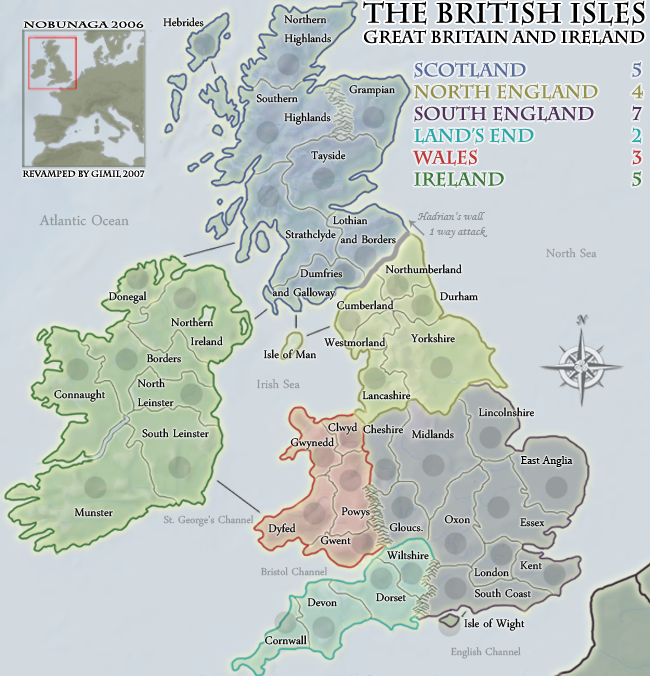
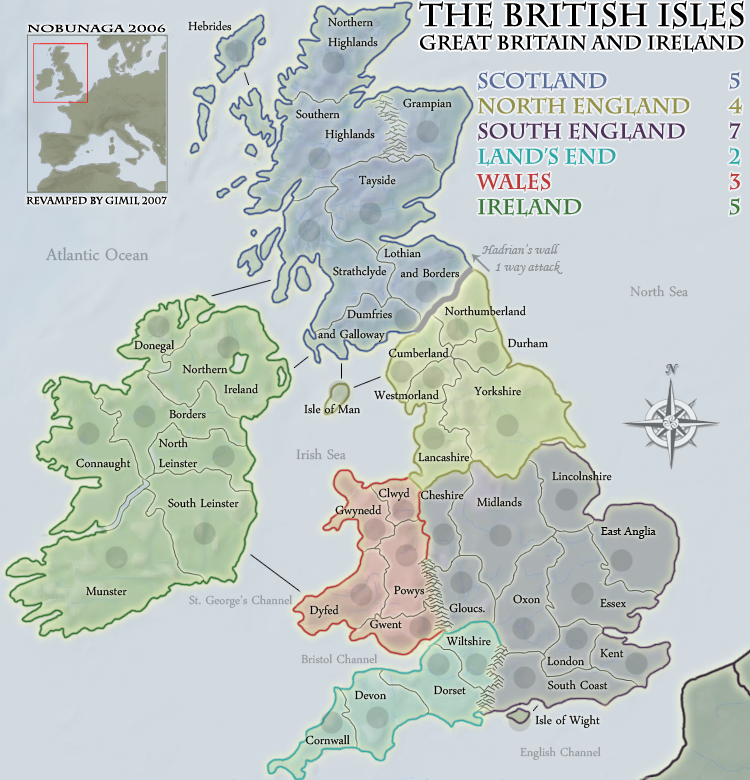
Coleman wrote:Your small map is too big in a lot of ways. 650 x 675 is a no. Also your small map is missing the Isle of Man circle.
Coleman wrote:Your small map is too big in a lot of ways. 650 x 675 is a no. Also your small map is missing the Isle of Man circle.
rebelman wrote:Coleman wrote:Your small map is too big in a lot of ways. 650 x 675 is a no. Also your small map is missing the Isle of Man circle.
its far worse than that is actually 650x 676 lol
MrBenn wrote:
2. I still think the ferry/shipping routes could do with some tidying up (try making them dashed and slightly curved if possible)
Other than that,
MrBenn wrote:MrBenn wrote:
2. I still think the ferry/shipping routes could do with some tidying up (try making them dashed and slightly curved if possible)
Other than that,
Other than that,
 I just dont know who to make desent dashed curved lines in photoshop, im experimenting
 AndyDufresne wrote:The current order in the legend, what is it suppose to reflect? What about a top down order?:Scotland
Ireland
North England
South England
Wales
Land's End
--Andy
gimil wrote:AndyDufresne wrote:The current order in the legend, what is it suppose to reflect? What about a top down order?:Scotland
Ireland
North England
South England
Wales
Land's End
--Andy
sure why not
altohugh i rather:
Scotland
Ireland
Wales
North England
South England
Land's End
keep all the english continents together.
http://www.planetphotoshop.com/dashed-lines-in-photoshop.htmlgimil wrote:MrBenn wrote:MrBenn wrote:
2. I still think the ferry/shipping routes could do with some tidying up (try making them dashed and slightly curved if possible)
Other than that,
Other than that,
lol im not ignoreing you
edbeard wrote:is there really a need for the large map to be that big?
could you have your small map be the large version (or something slightly larger), and just make another smaller map?
WidowMakers wrote:I remember reading a post that said the army circles were not round.
I think that is due to the fact that they are under the border glow layer in the photoshop file.
Dumfries, Cumberland and Clwyd are good examples.
Try putting the army circle layer on the top of everything else and the problem should go away.
WM
edbeard wrote:it looks weird that the border on ireland, the river I guess, has a thin border whereas the rest of the island is thick green.
any other ideas as to what to do with Hadrian's Wall? I just seems a little too simple. I know that's kinda the theme, but it just doesn't seem to work.
WidowMakers wrote:Just bumping this issue forward again.WidowMakers wrote:I remember reading a post that said the army circles were not round.
I think that is due to the fact that they are under the border glow layer in the photoshop file.
Dumfries, Cumberland and Clwyd are good examples.
Try putting the army circle layer on the top of everything else and the problem should go away.
WM