Page 1 of 1
Introduction
Posted: Wed Aug 03, 2011 1:16 pm
by thenobodies80
Hi and welcome to the Map Foundry.
Whether you're a veteran map maker or thinking about your first map, this guide is here to help you make the most out of the Foundry. We want to help your map's journey from an idea to a playable map to be the smoothest and best possible. By sticking to this guide, you can do just that.
If you have any questions about making a map or are considering making a map, but don't know where to start, the Foundry Cartographers are here to help. Feel free to ask us any questions as that's what we're here for.
The
Cartography Assistants
** A special thanks to MrBenn, natty_dread, DiM, ender516 and to all those who have contributed to the production of this guide.
The dynamics of the Foundry
Posted: Wed Aug 03, 2011 1:18 pm
by thenobodies80
- Click image to enlarge.

General Mapmaking Rules
Posted: Wed Aug 03, 2011 1:19 pm
by thenobodies80
General Mapmaking Rules
- Now, before starting your own map it is recommended that you read and understand the following rules to ensure that the process is as enjoyable and efficient as possible for you and the community at large.
 Map Accuracy Disclaimer
Although mapmakers are encuraged to be accurate while developing their maps, it is clear that the maps we have (and develop) on Conquer Club are not meant to depict any actual reality or history, etc. but made more for playability reasons. Graphics and historical accuracy are always utterly servient to the gameplay. We make maps that are meant to be played.
Title Requirements
- 1. Map Name
2. A Tag with the date of your latest update [dd Mmm yyyy] (e.g. [06 Jul 2011])
3. List what page(s) the latest update is on (e.g. [p1/5])
4. If you're after feedback for something specific, then you can always add a suffix (e.g. Thread Title wrote:Map Name [dd Mmm yyyy] p1/5 - Something for feedback? )
5. For every stamp received a CA will add a topic icon to your title; the color of the icon always identifies the latest stamp.
- Icons Schema:
 = Draft (once given the map is working towards the Gameplay stamp)
 = Gameplay (once given the map is working towards the Graphics stamp)
 = Graphics (once given the map is working towards the XML stamp)
 = XML (once given the map is practically ready for Beta play)
 = Beta (once given the map is in Beta and awaiting Final Quench)
Information Requirements on the first post of a map thread
- If you are looking to create a map yourself and you have a first draft, when you post it into the Drafting Room as a new topic, a pre-populated post will show:
Code: Select all
[b]Map Name:[/b]
[b]Mapmaker(s):[/b]
[b]Number of Territories:[/b]
[b]Special Features:[/b]
[b]What Makes This Map Worthy of Being Made:[/b]

[b]Map Images:[/b]
[i]Small[/i]
[bigimg][/bigimg]
[i]Large[/i]
[bigimg][/bigimg]
[/size]
General Rules
- 1. A map should be ‘inherently unique either in gameplay, location, or theme’.
2. Gameplay features must be compatible with the game engine's currently usable XML.
3. A map's content must be the original work of the cartographer unless consent to use copyrighted works is gained. This is your responsibility.
4. All sound advice must be followed unless a logical rebuttal by the mapmaker or another member of the community is provided.
5. To proceed through the foundry the community must show a reasonable amount of interest towards a map.
6. Host the image using Photobucket.com, imageshack.us, or something similar. The type of image file must be PNG or JPEG.
7. For a map to be used for live play the cartographer must agree to the Conquer Club Copyright Agreement.
8. All maps should be posted using [bigimg] tags instead of the standard ![Image]()
Good Foundry Conduct
- We know everyone has their own way of doing things. Below is our advice to you on good foundry conduct when it comes to posting map updates or posting feedback for a map you have interest in.
These are the basics which are needed when posting map updates to help make your development thread as easy to understand and follow as possible:
1. Post image links in [bigimg] tags.
2. List what you have changed for this update.
3. List what is on your To Do list.
4. List points that you feel need attention or discussion.
5. In addition to posting your update at the end of the thread, please keep the first post of the map thread up to date: The "first post" should always reflect the most current version of the map, and the title should include the date and page number of the most recent update.
These basic points will give a community member the information they need to best give feedback on your map, whether they have been regularly following your map, or are reviewing it for the first time.
If you have a map you're interested in and you intend to give it feedback, probably the best way to help the map maker when you post each piece of feedback is to remember the following three points:
1. State what your concerns are.
2. State why these are your concerns.
3. Most importantly, state what you believe is a good or possible solution to your concerns.
The closer to these three basic points you are, the better received your feedback will generally be, and the better the map will be as a result.
A comprehensive guide to giving and receiving feedback is contained within the
Foundry Feedback Guidelines.
Conquer Club Copyright Agreement
Posted: Wed Aug 03, 2011 1:20 pm
by thenobodies80
Conquer Club Copyright Agreement
- While many people contribute towards development of a map, it is the graphical artist who has recognised ownership of the map imagery, and must agree to the the following copyright agreement upon quenching:
The author retains copyright on their work, and gives Conquer Club permission to use the imagery free of charge, for as long as Conquer Club sees fit on the Conquer Club website. Conquer Club cannot sell, lease, or lend the right to use the images to anyone else. The author swears that their map is their own work, or a legal derivative work and by submitting it, do hereby claim all responsibility for that being true.
Abandoned & Vacationed Maps
Posted: Wed Aug 03, 2011 1:21 pm
by thenobodies80
Abandoned & Vacationed Maps Policy
- The topics placed into the Recycling Box are those map projects that have either been put on "Vacation" or have been "Abandoned":
Vacationed Maps
- All of us have a real life and everyone knows that sometimes it becomes hectic. For this reason, if a mapmaker has no way to work on a map for more than a month, but he is unwilling to abandon the project, he has the option to put the map on vacation. When the mapmaker asks for a vacation period, a CA will move the map topic into the Recycling Box, adding the [Vacation] tag to the map title.
- A map is put on Vacation only upon a clear request by the mapmaker.
- A map can NOT stay on Vacation for more than 6 months. If the mapmaker doesn't express a clear interest to continue the project, it will be considered abandoned.
- Regardless of the time needed by the mapmaker, the CAs will grant in every case 6 months.
- A mapmaker can start to work again on the map at any time, within the six months. Upon explicit request of the mapmaker, a CA will move the topic back into the Foundry Process, but only after that an update has been provided.
- Vacationed maps are easily recognizable because they have the [Vacation - valid untill MMM YY] tag into the title. (e.g. [Vacation - valid untill Aug 11])
Abandoned Maps
- Every mapmaker, which is developing a map that has received at least the draft stamp, is the only responsible of his map project. Mapmakers are defined and specified in the first post of each map topic. They must follow and work on the map project from the start to the end (quenched status), obviously on stuff that match with their respective roles.
Every mapmaker starts with a clean record.
We've set a scale of values, each value determines a disciplinary action.
- 1st Abandoned Map - Informal Warning and a spanking
2nd Abandoned Map - Official Warning
3rd Abandoned Map - 6 months of ban from mapmaking
4th Abandoned Map - 6 months of ban from mapmaking
5th Abandoned Map - Permanent ban from mapmaking
Additional Notes:
- If you don't have time for a project and it's a temporary thing, you can use vacation.
- Cartographers always apply the vacation status on a map when it's moved into the bin. So, from that moment you will have 6 additional months to "save" your map.
- Uncommon or extraordinary situations will be evaluated case by case.
- The Cartographer that oversee the Abandoned Maps policy is thenobodies80
If the map has NOT received at least the Draft Stamp, it will be considered just an advanced idea and therefore it will be moved back to the Idea Subforum. No tag added in this case.
IMPORTANT: Regardless of the current stage of development, a map will be considered abandoned if it has been vacationed for more than 6 months.
Medals
Posted: Wed Aug 03, 2011 1:21 pm
by thenobodies80
Mapmaking Medals Policy
There is a maximum of two medal recipients per map. One Mapmaking Medal will be awarded to the graphical artist who has recognised ownership of the map imagery. At the discretion of the Foundry Foreman, a second mapmaking medal may be awarded to one other co-developer. These "Primary Developer(s)" don't necessarily have to be the Graphics and XML developers, but usually are. Co-developers are not guaranteed a medal. In cases where more than one person has collaborated/assumed primacy on a map, the Foundry Foreman and Cartography Assistants will determine who has made the most significant contribution to the development of map mechanics and graphics and decide whether or not a second medal should be awarded.
The Drafting Room
Posted: Wed Aug 03, 2011 1:23 pm
by thenobodies80
The Drafting Room

The draft stamp is required for a map project to be moved from the Drafting Room to the Main Foundry Workshops.
To earn this stamp the map must meet the following conditions:
- 1)The map, first and foremost, must have a clear plan of how production will go
2) Have a playable image. (If it would be quenched instead of Draft stamped, would it be possible to play on it?)
This should include the following:
- Territory names
- Working legends
- Speculative Bonuses
- Tentative Border Divisions
3) The working image needs to be beyond rough draft state. This means that you must provide the following:
- A working image done in some kind of graphic software. Pencil-drawn images and images done on Microsoft Paint will not be accepted or considered a working draft.
- At least two quality updates must be provided.(*)
4) Have honest and interested discussion. Not just you and three friends.
(*) Note: This requirement applies only to mapmakers with no maps quenched. The quality updates are required only to ensure that the mapmaker has got what it takes to use graphics software and reach Conquer Club standards.
Supersize Applications
- Sometimes developing a map within the standard limits can be a pain. For this reason the Cartographers may authorize the use of additional space. Obviously, a map project must need the additional space (i.e., they shouldn't be unnecessarily big, just for the heck of it), and mapmakers will be required to suggest their intended image sizes while the map is in the Drafting room. Please read the Supersize Maps Announcement on what the guidelines are to receive supersize status!
In some situations it may happen that the map needs extra space only after going beyond the Drafting Room. In these situations the application is not necessary and a decision will be made on a case-by-case basis by the Cartographers.
Gameplay
Posted: Wed Aug 03, 2011 1:25 pm
by thenobodies80
Main Foundry Workshop: Gameplay

The development of solid, balanced gameplay is the first challenge of map development. In order to meet gameplay expectations and make your map successful, you will need to incorporate the following elements:
- Balanced Deployment - It should be unlikely that one or more players can start the game with a major advantage as a result of the initial drop or getting the first turn. Conquer Club is primarily a strategy game, and we therefore like to minimise as many of the luck factors as possible - the dice are random enough!
Balanced Deployment
- Map Sizes:
- From a gameplay perspective, the map size refers to the total number of territories on a map, rather than the size of the canvas. At extreme ends of the spectrum, the very smallest and very largest maps are likely to give an advantage to whoever goes first. There are no defined limits for map sizes, although maps should have more than 24 territories in order to minimise the risk of first-round eliminations in 8-player games. There is no upper size limit, although the constraints of legibility and clarity need to be considered.
Starting Territories:
- The number of starting territories varies from the total number of territories on a map, as the game engine distributes territories equally amongst the players, allocating the rest as neutral. In all forms of the game, knocking one or more players into a lower territory band is a fundamental tactic, and so when each player starts with 12/15/18/etc territories, whoever happens to go first gets a huge advantage. Optimising fairness of the drop is therefore regarded as more important than minimising the number of neutral starts.
The following are the "golden numbers" lower than 200, which create a drop that in all (or all except 5/7p) forms of the game require two or three territories to be taken from a player before they are disadvantaged due to territory count and happening to not go first: 24-35, 42, 43, 44, 52, 53, 57, 58, 59, 66, 67, 68, 69, 70, 71, (78), (79), 80, (88), (89), 104, 114, 115, 116, (138), (139), 140, 141, 142, 143, 160, 161, 176, 177, 178, 179, 186, 187, 188
(Golden Numbers PDF version with more details)
Where the total number of territories on the map is not equal to one of these "golden numbers", then expect to be asked to create/merge territories or to code some as neutral in order to ensure that the total number of starting territories is balanced for fair play.
Reasonable Bonus Structure
- Standard Continent Bonuses:
- Ever since the Classic Map has had continents, people have been fighting to control bonus zones. Bonuses should make sense given the size/style of the map, and be based on a consistent formula. Consideration should be given to balancing the strength of the board, ensuring that no specific area of the map gives an overwhelming advantage from the start of a game. One of the best places to start is with one of the Continent Bonus Spreadsheets in the Map Making Tools topic. The spreadsheets calculate bonus values based on limited information about the number of territories in each region. The results are a good rough guide to what a bonus is worth, although the mapmaker may want to use higher or lower bonus values depending on the type of gameplay they're trying to achieve, and the spreadsheets sometimes suggest values that are too low for central/congested areas of a map.
Each bonus needs to be considered on a local and global perspective: Simply saying, "this continent has 5 territories and 4 borders so it should be +5" is not always correct. If there was a smaller continent adjacent to it which if held together would be 7 territories and 4 borders with a bonus of +7 then you've probably made a mistake. Think about what would happen in game situations - some continents will obviously be held early; is this going to overpower everyone else? Each bonus needs to make sense in relation to the other bonuses.
Non-Standard Bonuses:
- In addition to standard continent bonuses, there are a wealth of non-standard bonus options which can include non-contiguous continents, autodeploys (and decay), and build-your-own bonuses. The style of gameplay you are trying to achieve will have an impact on the bonus structure - classic, conquest, resource-based, etc. There are no hard-and-fast rules about what is acceptable, although extravagant imbalance should be avoided: the Bonus Probability Calculator can be used to get a feel for the likelihood of any player dropping a particular bonus. As an arbitrary guide, probabilities above 5-10% should be avoided wherever possible.
Player-friendliness - Any information you need to know to play a map should be easy to gather by looking at the map itself. The legend should be clear, concise and consistent, and the map itself should be free of unnecessary or cumbersome rules that push it over the line separating complex from confusing.
Open Play - There should be many ways a game might progress on a map, and many roads to victory. Such features as impassable borders should enhance, not limit, gameplay, and every effort should be made to limit the number of dead ends and bottlenecks in a map, unless they are justified by the desired play of the map. The map should be fun to play, not frustrating.
Function Trumps Form - The style of the graphics should not detract from ease of play: borders should be clear, titles and numbers easy to read, colors easy to distinguish, etc...
Form Must Follow Function - So important it's on the list twice! Expect to show some flexibility and be prepared to move away from complete geographical accuracy or historical authenticity: the look and theme of the map must be utterly subservient to gameplay and legibility.
Gameplay Advice: Mapmakers are strongly encouraged to scrutinize every bonus or rule they have in place, and ask themselves: "Does this enhance the theme or support my goal for the map?" (referring to the theme & goal that they presumably developed in the Drafting Room). If the rule or bonus isn't essential to the map's goal/theme, then it almost certainly should be axed.
For more details please take a look at the
Gameplay Guidelines.
Graphics
Posted: Wed Aug 03, 2011 1:25 pm
by thenobodies80
Main Foundry Workshop: Graphics

Once a map has been awarded a stamp for Gameplay, it is time to set about transforming it into a work of art that would sit comfortably alongside other CC maps in the Viewing Gallery. There are fairly few rules and restrictions about graphics development:
- Map Sizes - Each map must eventually be submitted in two sizes. The 'large' map may be up to 840px wide and 800px high (supersize up to 1200px wide and 1000px high). The 'small' map may be up to 630px wide and 600px high (supersize up to 780px wide and 650px high). Mapmakers are encouraged to make their 'large' maps smaller than the maximum size limits when possible. The 'large' map must be noticeably larger than the 'small' map; 9% larger is required but 33.3% (1/3) is recommended. The majority of mapmakers begin working on their large image; although it is worth ensuring that everything will remain clear and legible on the small image relatively early in development.
Army Numbers - Army numbers are an essential component of every CC map. Their placement is important - it must be clear which 'territory' each army belongs to, and there must be enough room to fit a three digit number without compromising legibility of borders or labels. You may wish to use CC Army Digit Images to see how the map looks with the addition of army numbers, and to check the placement of 'army circles' if you choose to use them.
Clarity and Readability - The image must present itself as clear and legible. Any information you need to know to play a map should be easy to gather by looking at the map itself: Borders and attack routes should be clear (or clearly explained if unconventional borders are used), bonus regions should be indicated clearly; any non-standard groupings, combinations, and permutations should be clearly explained. The legend should be clear, concise, and consistent. The map itself should be free of unnecessary or cumbersome rules that push it over the line separating complex from confusing.
Colorblind Check - Mapmakers must, where possible, reduce any disadvantage that can be caused to a colorblind individual. The image should be subjected to a Colorblind Check to ensure that regions, attack routes etc. are colorblind-friendly.
Thematic Consistency - The look and general appearance of the map should fit with the theme of the map. You will need to consider how all the visual aspects of map fit the theme (pixellated vs. smooth borders; bright vs. dark; clean vs. grunge; compatible font selection, etc. etc.).
Here are some questions that you can ask yourself before you make a map:
While not every question will be appropriate for every map, they will help you focus your ideas and design:
- Who are the characters in the map? (why is this map significant or a cool backstory)
- What is your map about?
- Where does it take place?
- When does it take place?
- Why are the events taking place? (again, backstory)
- How will the events unfold?
- Anything else?
Graphical benchmarks are subjective and it is difficult to legislate for them: the Foundry Team members are the final arbiters of map quality, and will ultimately judge whether or not a map meets the Conquer Club standard.
All map makers are expected to take all graphical comments into consideration and must either accept them or give sound reasoning as to why not to take particular advice.
For more details please take a look at the
Graphics Guidelines.
XML
Posted: Wed Aug 03, 2011 1:26 pm
by thenobodies80
Final Forge: XML

Once a map has received both the Gameplay and the Graphics stamps, it is time to start writing the XML. There's no need to be afraid of writing XML - it's simply a technical description of a map that enables the game engine to convert a finished map image into a playable board.
How do you do it?
- The Development - The XML has to follow a precise schema, full details of which are available in the XML Tutorial. While you don't need anything more complicated than notepad to write your XML, the are a couple of community-developed tools that may help, the more noteworthy is certainly the Online Map XML Wizard.
XML Checking - Once the XML has been completed, it will need to be posted in your thread by uploading your file to a host site and posting a link to it in [/url] tags or, much better, attaching the file to your map thread. It is also necessary to submit map image/XML links in the Official Map XML Check Thread (Note: Make sure you've already validated and checked the XML, as specified, before posting for an official check).
For more details about how to write XML, please take a look at the
XML Guide.
Beta & Quench
Posted: Wed Aug 03, 2011 1:27 pm
by thenobodies80
Final Forge: Beta & Quench

While the map is in the Final Forge, in addition to writing the XML, it may be necessary to make minor amendments to the graphics or gameplay of a map to ensure that everything is clear and balanced for prospective players. Once the XML has been checked and the map has addressed all the final suggestions and concerns, it should be ready to be played, so it receives the Beta stamp and in short order it becomes available to the whole Conquer Club community.
- The community has the final say on the quality of a map - During the Beta period, the map is played by the Conquer Club Community and the mapmaker will be required to respond to all advice or suggestions and fix any issue on the map, unless a logical rebuttal by the cartographer or another member of the community is provided. The Beta period is complete ONLY when the community at large is satisfied and there are no more suggestions, issues, or complaints.
Once the Beta period has ended and all the objections have had their time, the map is ready to receive the last Foundry brand:

The map is now quenched, and the map thread will be moved into the
Viewing Gallery and the mapmaker(s) will receive the medal for their contribution.
Contacts
Posted: Wed Aug 03, 2011 1:28 pm
by thenobodies80
Contacts
Although the Foundry Process is based on the community at large, the Map Foundry is officially overseen by a group of Volunteers, the
Cartography Assistants (sometimes called Cartographers or just CAs). They can be recognized easily by the
blue-colored name.
In order to keep the Foundry flowing and to facilitate the earlier stage of development (i.e. Drafting Room), from time to time, the Cartographers recruit small groups of people, the Foundry Assistants (FA).
- Below is the list of current Cartographers (and Foundry Assistants), names, roles, responsibility area and additional tasks:
- thenobodies80, Foundry Foreman
- Melting Pot/Drafting Room
Assisting New Mapmakers
iancanton,
- Gameplay
Gameplay questions/Issues
General Mapmaking questions/Issues
koontz1973,
- Gameplay
Gameplay questions/Issues
General Mapmaking questions/Issues
Contests
RedBaron0,
- Graphics
Graphics questions/Issues
General Mapmaking questions/Issues
isaiah40, Deputy Foundry Foreman
- Graphics
Graphics questions/Issues
General Mapmaking questions/Issues
Gilligan, XML Checker
thenobodies80, Foundry Foreman
- Final Forge/Beta
Oversees the mapmaking process
Medals Assignment
General Mapmaking questions/Issues
Foundry Guidelines questions/Issues
Contests Issues
XML/Map Issues
Please remember that the Foundry Assistant are here to help ONLY with the mapmaking process (i.e. move topics, stamp maps, check xml). If you have any map-related issues or questions, please contact one of the
Cartographers.
Mapmaking Tools
Posted: Wed Aug 03, 2011 1:29 pm
by thenobodies80
In order to complete a project, a mapmaker must have access to software and tools.
First of all, every mapmaker must have graphics software.
There are several graphics software around, but mostly our mapmakers use:
Adobe Photoshop® - 30 Days Trial
GIMP - Free
Fireworks - 30 Days Trial
To be able to get a map through the Foundry you must also upload your images and XML onto a hosting site:
Photobucket - Highly reliable site that lets you upload and store image files. 1GB storage space and 25GB of monthly bandwidth allowance for free members.
Imageshack - Free file storage with unlimited space and unlimited bandwidth. Additional tools/plugins that allow for quick and easy uploading of images.
Ripway.com - Good hosting site that allows you to upload any file type. Good for both XML and images. Small bandwidth and storage allowance.
Fileden.com - A free file hosting site. 1GB of personal storage space. 50MB maximum file size limit. 5GB of monthly bandwidth. Direct link to XML files.
In addition, several members of the community have created some tools to help the process of map creation along:
Official Mapmaker XML Tool - Checks the validity of XML map code
Army Circles Images - The standard 22px diameter circle image ready-to-use, you only need to set the transparency according to your preferences.
Army Numbers Images - The 0-9, 88 and 888 digits in all colors. Useful in case you want to show neutral troops or test if everything fits on the map.
Bonus Calculator - An Excel Spreadsheet to assist you with the bonuses. Insert into the fields all the required data and it will give you the suggested values.
Bonus Probability Calculator - An Excel Spreadsheet to assist in determining how likely a player is to drop a specific bonus (regular or build-your-own).
How to use [Tags] & Attachments
Posted: Wed Aug 03, 2011 1:29 pm
by thenobodies80
How to use [Tags] & Attachments
BBCode Tags
BBCode is a special implementation of HTML, offering great formatting control on particular objects in a post. BBCode tags are enclosed in square brackets: [ and ].
-
Insert an Image: [/img] and [/BigImg] Tags
- To post your map image you can use the [/img] tag or preferably the [/BigImg] tag. To do this, you have to copy/paste your map image URL between the two tags with the following format:
or
For example,
Code: Select all
[img]http://static.conquerclub.com/logo.png[/img]

-
Insert a Link: [/url] Tag
- The [/url] tag can be used to post any URL. For example, it could be useful to have your older versions of your map listed into the first post without using images.
To use this tag you have to copy/paste your URL between the tags.
There's an additional version of this tag. If you want to have some text to replace the link, you can do that in this way:
Code: Select all
[url=http://your_url.com]your_text[/url]
Code: Select all
[url]http://www.conquerclub.com[/url]
Code: Select all
[url=http://www.conquerclub.com]Conquer Club[/url]
-
Insert a Spoiler: [/spoiler] Tag
- The spoiler tag can be used to hide from view a part of your post. For example, the mapmakers can use it to include a list of old version links into the first post, but have them hidden from view.
Code: Select all
[spoiler]your_stuff_here[/spoiler]
your_stuff_here
Code: Select all
[spoiler=example]This spoiler also has a [i]"example"[/i] label.
To insert a label you need to add [b]=your_label[/b] to the opening tag, like in this example.
Now click [u]hide[/u] to close this spoiler[/spoiler]
This spoiler has also a "example" label.
To insert a label you need to add =your_label to the opening tag, like in this example.
Now click hide to close this spoiler
Attachments
- A mapmaker can decide to attach the XML to the map topic instead of using a hosting site.
The attachment tab is located at the bottom of the posting page, next to the post option tab.
- Click image to enlarge.
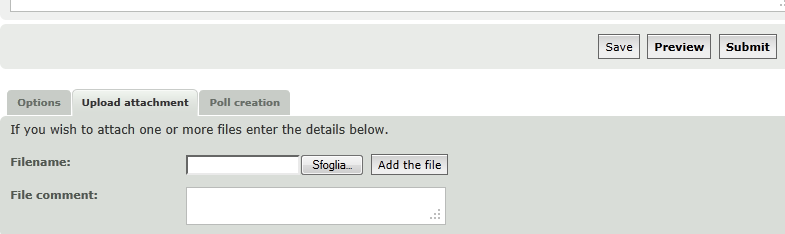
NOTE: At the moment attachments can only be used in the Final Forge.
Getting Started: