GIMP problem

Talk about all things related to Conquer Club

Moderator: Community Team

Forum rules
Please read the community guidelines before posting.
Post Reply
User avatar
theBastard
Posts: 994
Joined: Sat Jan 09, 2010 9:05 am

GIMP problem

Post by theBastard »

I can not draw on my map. everything works fine to the time when I added "Outer glow" around rivers and deleted (transparency) some small places of "Outer glow). after this I can not draw on my map. I deldeted "Outer glow", I creared new layer, but I still can not draw.
everything looks right, I can not see any problem with layers or any set up. so where can be problem?

EDIT: when I choose area of layer with "Free select toll" and than colour it works... but "Pencil toll" and "Paintbrush tool" do not work...

User avatar
theBastard
Posts: 994
Joined: Sat Jan 09, 2010 9:05 am

Re: GIMP problem

Post by theBastard »

problem solved. but I do not know. just I´ve restart GIMP and avarything works.

EDIT: sorry guys. I have the same problem again. I did "Outer glow" and again I can not draw. I´ve restart GIMP but still nothing...
is it usual that after using Script_Fu is this problem?
User avatar
RedFlyingGolf
Posts: 177
Joined: Sat Aug 28, 2010 1:22 pm
Gender: Male
Location: You wish you knew.

Re: GIMP problem

Post by RedFlyingGolf »

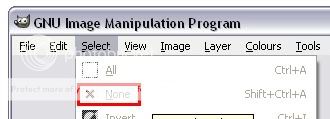
is anything selected. Be sure to click Select>None
Image
High score: 1991 Captain
Achieved November 21th, 2010
User avatar
theBastard
Posts: 994
Joined: Sat Jan 09, 2010 9:05 am

Re: GIMP problem

Post by theBastard »

everything is as before "Outer glow" was added. what you exactly mean Select-None?

the problem must be, I think only in this one map. when I open another picture I can draw...
ManBungalow
Posts: 3431
Joined: Sun Jan 13, 2008 7:02 am
Location: On a giant rock orbiting a star somewhere

Re: GIMP problem

Post by ManBungalow »

theBastard wrote:what you exactly mean Select-None?
Image

When you create a 'selection' using GIMP, you will be able to draw in that area only.
Select -> None should allow you to draw anywhere on the canvas again.
Image
User avatar
theBastard
Posts: 994
Joined: Sat Jan 09, 2010 9:05 am

Re: GIMP problem

Post by theBastard »

thanks guys. problem solved by thenobodies :)
Post Reply

Return to “Conquer Club Discussion”