Hello all,
I am new to the club. I am playing 'Classic' but am having difficulty discerning which player owns which territory. Is there a display mode that make things clearer? I already set the board to Large, but there does not seem to be anything else I can do.
I find the easiest and most useful tool is to hover over peoples usernames in the player list. When you hover a players name it highlights each of their territories (at least the ones you can see in fog). For me this is especially helpful when differentiating between green and blue, or pink and red when they are next to each other.
Another option you can use is to toggle the map opacity and circle whiteness in the settings tab.
some of the old maps were made well before the advent of larger games, etc... some of them didn't take into consideration the difficulty in seeing the numbers on the maps... however, that is, as others said, why the colour codes were created... well, that and for colour blind people (despite the years long idiotic suggestions thread that more needs to be done for people like me that are colour blind)... anyway, my maps look like this:
so, go to game settings and turn the COLOR CODES to ON... the black jesus has spoken...-Jésus noir
Thorthoth,"Cloaking one's C&A fetish with moral authority and righteous indignation
makes it ever so much more erotically thrilling"
Under Settings, you have two very important settings. One is Map Opacity, and the other is Circle Brightness.
Map opacity fades the map so that the numbers stand out better. Circle Brightness brightens the circle behind the numbers so the numbers stand out better. Use either one of these, or both together, on maps like Europe where the troop numbers are hard to see.
Colour codes are a terrible solution. All that extra clutter. Some combination of Map Opacity and Circle Brightness will do the trick for you and make the numbers easy to see on any map. Unless you're completely and radically colour-blind, there's no reason to burnen yourself with Colour Codes.
“Life is a shipwreck, but we must not forget to sing in the lifeboats.”
― Voltaire
Dukasaur wrote:Colour codes are a terrible solution. All that extra clutter. Some combination of Map Opacity and Circle Brightness will do the trick for you and make the numbers easy to see on any map. Unless you're completely and radically colour-blind, there's no reason to burnen yourself with Colour Codes.
as i said, i'm colour blind, so colour codes are the best solution for me. i can't speak for FADING the map or whatever, because it would just make it more difficult for me to play a map, unless i knew it very well...-Jésus noir
Thorthoth,"Cloaking one's C&A fetish with moral authority and righteous indignation
makes it ever so much more erotically thrilling"
Dukasaur wrote:Colour codes are a terrible solution. All that extra clutter. Some combination of Map Opacity and Circle Brightness will do the trick for you and make the numbers easy to see on any map. Unless you're completely and radically colour-blind, there's no reason to burnen yourself with Colour Codes.
as i said, i'm colour blind, so colour codes are the best solution for me. i can't speak for FADING the map or whatever, because it would just make it more difficult for me to play a map, unless i knew it very well...-Jésus noir
Yeah, sorry. I wasn't trying to minimize the impact of your colour-blindness. For you, colour codes are the best option.
I was assuming the OP was not colour-blind and was just having trouble with the maps that have too-dark circles or too-intense colours. For him, those the other options may work better.
“Life is a shipwreck, but we must not forget to sing in the lifeboats.”
― Voltaire
Dukasaur wrote:Under Settings, you have two very important settings. One is Map Opacity, and the other is Circle Brightness.
Map opacity fades the map so that the numbers stand out better. Circle Brightness brightens the circle behind the numbers so the numbers stand out better. Use either one of these, or both together, on maps like Europe where the troop numbers are hard to see.
Colour codes are a terrible solution. All that extra clutter. Some combination of Map Opacity and Circle Brightness will do the trick for you and make the numbers easy to see on any map. Unless you're completely and radically colour-blind, there's no reason to burnen yourself with Colour Codes.
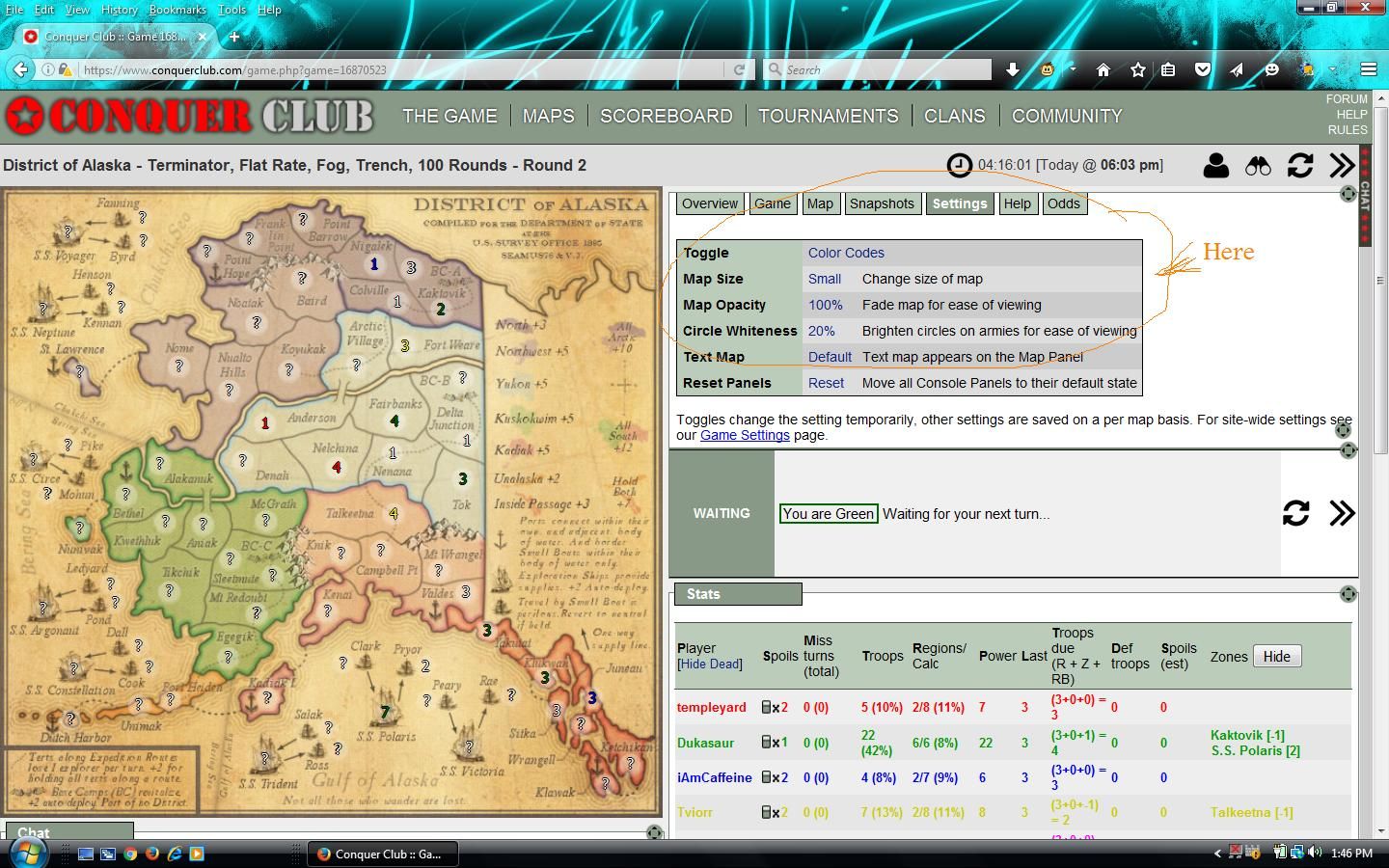
Okay, I have been around a while and I can't find Map Opacity or Circle Brightness. Where under Settings would these be. I have looked and relooked, (in an effort to not appear stupid, lost cause I know).
Dukasaur wrote:Under Settings, you have two very important settings. One is Map Opacity, and the other is Circle Brightness.
Map opacity fades the map so that the numbers stand out better. Circle Brightness brightens the circle behind the numbers so the numbers stand out better. Use either one of these, or both together, on maps like Europe where the troop numbers are hard to see.
Colour codes are a terrible solution. All that extra clutter. Some combination of Map Opacity and Circle Brightness will do the trick for you and make the numbers easy to see on any map. Unless you're completely and radically colour-blind, there's no reason to burnen yourself with Colour Codes.
Okay, I have been around a while and I can't find Map Opacity or Circle Brightness. Where under Settings would these be. I have looked and relooked, (in an effort to not appear stupid, lost cause I know).
In the in-game settings, not the left-nav settings.
Click image to enlarge.
You have to have Panels turned on, I think.
“Life is a shipwreck, but we must not forget to sing in the lifeboats.”
― Voltaire