

tech help with pictures, anyone?
Moderator: Community Team
Forum rules
Please read the Community Guidelines before posting.
Please read the Community Guidelines before posting.
-
jonesthecurl

- Posts: 4625
- Joined: Sun Mar 16, 2008 9:42 am
- Gender: Male
- Location: disused action figure warehouse
- Contact:
tech help with pictures, anyone?
So I downloaded a simple image from canstock, it's a number of curly ribbons. The background is checkered grey-and-white, which in many picture-editing programs means "white space". I had expected to be able to import this image into a picture-editing program and assume that the checkered background would translate. So far every program I've imported it into sees the checkered background as checkers. If I erase part of the background I get a different size of checkers. All I want to do is to be able to take various ribbon images and use them as layers in a picture. Any suggestions?
instagram.com/garethjohnjoneswrites


Re: tech help with pictures, anyone?
The checkerboard shows the that area is transparent. Allows the background to become anything you choose.
Look on YouTube for similar to this.
Photoshop working with transparencies.
Look on YouTube for similar to this.
Photoshop working with transparencies.
-
jonesthecurl
- Posts: 4625
- Joined: Sun Mar 16, 2008 9:42 am
- Gender: Male
- Location: disused action figure warehouse
- Contact:
Re: tech help with pictures, anyone?
Thank you both. I do understand the checkerboard convention: it means 'transparent' - i.e. if there's only one layer it is effectively blank, if there's layers beneath you see through to the next layer. But when I import the picture to inkscape, paint.net or krita, it imports the checkers as actual checkers. If I erase that part of the pic, I get different sized checkers, showing the actually transparent bit.
Here: I've erased a part of the checker pattern in paint.net, and added a layer beneath with a splash of paint to illustrate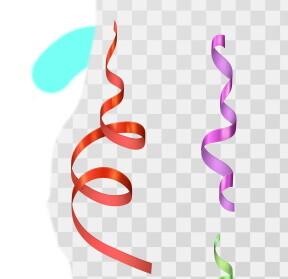
Here: I've erased a part of the checker pattern in paint.net, and added a layer beneath with a splash of paint to illustrate
instagram.com/garethjohnjoneswrites
Re: tech help with pictures, anyone?
Would "flattening" the image help?
Re: tech help with pictures, anyone?
Jpeg does not allow transparent backgrounds. You need to use a different file type.jonesthecurl wrote:Thank you both. I do understand the checkerboard convention: it means 'transparent' - i.e. if there's only one layer it is effectively blank, if there's layers beneath you see through to the next layer. But when I import the picture to inkscape, paint.net or krita, it imports the checkers as actual checkers. If I erase that part of the pic, I get different sized checkers, showing the actually transparent bit.
Here: I've erased a part of the checker pattern in paint.net, and added a layer beneath with a splash of paint to illustrate
When you bought it, were there different file type options? I say this because you uploaded a JPG, that might be your problem.
░▒▒▓▓▓▒▒░
-
jonesthecurl
- Posts: 4625
- Joined: Sun Mar 16, 2008 9:42 am
- Gender: Male
- Location: disused action figure warehouse
- Contact:
Re: tech help with pictures, anyone?
I'm beginning to discover this, There's also a EPS file, but I'm having a bugger of a time doing anything with it.
instagram.com/garethjohnjoneswrites
Re: tech help with pictures, anyone?
Try Paintshop pro? I'm not familiar with EPS. It's strange that they would give you a transparent background in jpg format. That's almost a troll, but let's assume they are well-meaning and call it an oversight instead.
░▒▒▓▓▓▒▒░
-
jonesthecurl
- Posts: 4625
- Joined: Sun Mar 16, 2008 9:42 am
- Gender: Male
- Location: disused action figure warehouse
- Contact:
Re: tech help with pictures, anyone?
Actually, it's too late for what I wanted, but this proved very simple to solve.
(1) Open a Word document
(2) IMport the picture
(3) click on 'Format Picture'
(4) click on 'remove background'.
(1) Open a Word document
(2) IMport the picture
(3) click on 'Format Picture'
(4) click on 'remove background'.
instagram.com/garethjohnjoneswrites