

BOB version 1.2 [was CC Greasemonkey script - unofficial]
Moderator: Tech Team
Forum rules
Please read the Community Guidelines before posting.
Please read the Community Guidelines before posting.
-
alex_white101
- Posts: 1992
- Joined: Sun Feb 25, 2007 1:05 am
i dont know if this has been suggested, so im gonna suggest it anyways and u can always shoot me down. but mayb there could be some kind of team stats? such as number of team armies and team territories, i know i could just add up what is there for each player but i like being lazy........also i could just not have this add on and count armies and territories but i like being lazy so i have this excellent add on!
''Many a true word is spoken in jest''

This will be in BOB v1.1alex_white101 wrote:i dont know if this has been suggested, so im gonna suggest it anyways and u can always shoot me down. but mayb there could be some kind of team stats? such as number of team armies and team territories, i know i could just add up what is there for each player but i like being lazy........also i could just not have this add on and count armies and territories but i like being lazy so i have this excellent add on!
r.

I'm having a few problems with greasemonkey on a new map. See screenshot below:
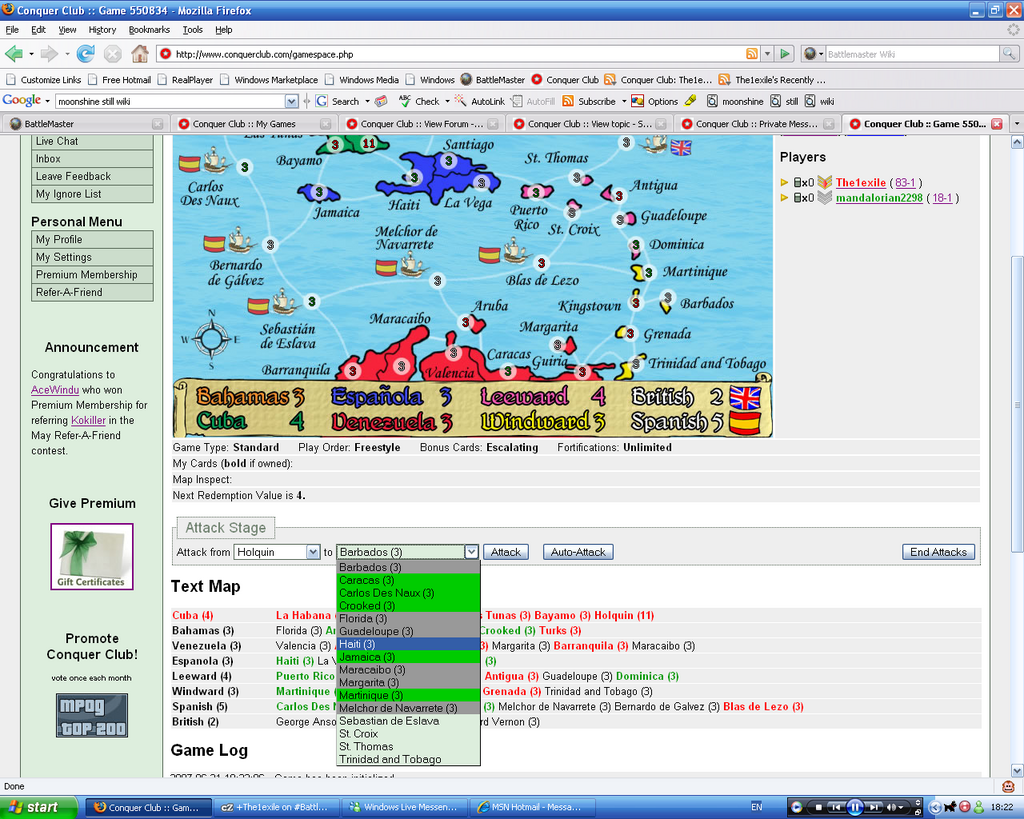
Issues:
-Stats are missing
-Options at the side are missing
-background colour of the selections in the drop down box stop near the end of the list.
Sometimes it works, and sometimes it disappears. really weird.
Any suggestions on what's causing it/how to fix it?
Issues:
-Stats are missing
-Options at the side are missing
-background colour of the selections in the drop down box stop near the end of the list.
Sometimes it works, and sometimes it disappears. really weird.
Any suggestions on what's causing it/how to fix it?


I've come to report problems with the same map in my game.
http://www.conquerclub.com/game.php?game=547968
It works fine at the beginning of my turn, but dies as soon as I successfully attack a territory. Then it won't work during or after deployment.
http://www.conquerclub.com/game.php?game=547968
It works fine at the beginning of my turn, but dies as soon as I successfully attack a territory. Then it won't work during or after deployment.
I have started a game on this map to take a look into the problems, I will let you know how I get on.Sparqs wrote:I've come to report problems with the same map in my game.
http://www.conquerclub.com/game.php?game=547968
It works fine at the beginning of my turn, but dies as soon as I successfully attack a territory. Then it won't work during or after deployment.
r.
Problem Found:stocksr wrote:I have started a game on this map to take a look into the problems, I will let you know how I get on.Sparqs wrote:I've come to report problems with the same map in my game.
http://www.conquerclub.com/game.php?game=547968
It works fine at the beginning of my turn, but dies as soon as I successfully attack a territory. Then it won't work during or after deployment.
n the XML "Sebastian de Eslava" has 2 spaces between "Sebastian" and "de"
reported to map maker & fixed BOB v1.1.
r.
BOB version 1.1
BOB v1.1 is Out.
BOB v1.1 is broken
see BOB v1.2 further down.
BOB v1.1 is broken
see BOB v1.2 further down.
Last edited by stocksr on Fri Jun 22, 2007 8:17 am, edited 1 time in total.
r.

The1exile wrote:Problem with v1.1
The confirm phase end no longer works so there's no confirmation box for ending attack/fortifications.
Sorry guys, I will have fixes for these in v1.2 - due out later today.benjikat wrote:I have just updated to v1.1, and now have a display issue - the continent bonuses no longer stay within the display width, but just remain in a single line. For the Age of Merchants map this can be a very long line!
r.
BOB version 1.2
BOB v1.2 is Out.
http://robertstocks.co.uk/conquerClub/c ... .2.user.js
What's New
Map Fade is a now a per MAP setting:
Upgrading Users will inherit your CURRENT setting as a default for new maps.
New installs will have 0% map fade as a default
Stats and Text Map settings no longer require a refresh on settings change
The Confirm Settings also no longer require a refresh on settings change
Team Stats !
Bug Fix - Caribbean Islands map had inconsistent spaces in name
Fix a couple of BUGS I introduced in v1.1
http://robertstocks.co.uk/conquerClub/c ... .2.user.js
What's New
Map Fade is a now a per MAP setting:
Upgrading Users will inherit your CURRENT setting as a default for new maps.
New installs will have 0% map fade as a default
Stats and Text Map settings no longer require a refresh on settings change
The Confirm Settings also no longer require a refresh on settings change
Team Stats !
Bug Fix - Caribbean Islands map had inconsistent spaces in name
Fix a couple of BUGS I introduced in v1.1
r.
it requests it from http://www.conquerclub.com/maps/ it could be cached someware between the server and your browser, try visiting http://www.conquerclub.com/maps/Age_Of_Merchants.xml in firefox and see if that is up to datebenjikat wrote:How is the xml read by this script? Because even thought the Age of Merchants xml seems to have been fixed and replaced, this script is still showing the old one for me in terms of the territory connections hover and bonus calculations.
r.
Re: BOB version 1.2
Yay!stocksr wrote:BOB v1.2 is Out.
Double Yay!!stocksr wrote:Map Fade is a now a per MAP setting:
Triple Yay!!!stocksr wrote:Stats and Text Map settings no longer require a refresh on settings change
Which is eitherstocksr wrote:
- An unintended change brought about by the refresh changes
- Considered too minor to mention
- A super-secret plot to remove joy from the world, a few pixels at a time
The standard stats no longer show * ** *** to indicate how close to deployment reduction a player is. I don't know if that was by accident or on purpose. If on purpose, I vote for their restoration. I find the extended stats too dense (where these do appear) and having these on the standard stats is very helpful - a quick glance conveys vital info (the sign of a thoughtful UI).
Re: BOB version 1.2
I pick option A - I will put them back for 1.3. Sorry.Sparqs wrote: Which is eithereh, what?
- An unintended change brought about by the refresh changes
- Considered too minor to mention
- A super-secret plot to remove joy from the world, a few pixels at a time
The standard stats no longer show * ** *** to indicate how close to deployment reduction a player is. I don't know if that was by accident or on purpose. If on purpose, I vote for their restoration. I find the extended stats too dense (where these do appear) and having these on the standard stats is very helpful - a quick glance conveys vital info (the sign of a thoughtful UI).

r.

Re: BOB version 1.2
I seem to still have that on 1.2?stocksr wrote:I pick option A - I will put them back for 1.3. Sorry.Sparqs wrote: Which is eithereh, what?
- An unintended change brought about by the refresh changes
- Considered too minor to mention
- A super-secret plot to remove joy from the world, a few pixels at a time
The standard stats no longer show * ** *** to indicate how close to deployment reduction a player is. I don't know if that was by accident or on purpose. If on purpose, I vote for their restoration. I find the extended stats too dense (where these do appear) and having these on the standard stats is very helpful - a quick glance conveys vital info (the sign of a thoughtful UI).

When you are having a turn the clock counts down from 1 hour to 0...
When someone else is having a turn it stays on the 24 hour count down...
For Sequential games - could we swap it to count down the hour of the person having the turn?
(Technically this is a site "bug" but I reckon Bob could sort it out?)
C.
When someone else is having a turn it stays on the 24 hour count down...
For Sequential games - could we swap it to count down the hour of the person having the turn?
(Technically this is a site "bug" but I reckon Bob could sort it out?)
C.

Highest score : 2297
-
Sargeant_Pepper

- Posts: 58
- Joined: Mon Jan 01, 2007 8:03 pm
- Contact:
I am very happy with 1.2. Fortunately, I didn't know about 1.1 and didn't install it!
I have a question that has likely been asked 10,000 times - I'm so sorry, but I have searched and cannot find the answer. What do the little asterisks mean beside the "territories" column in the "Stats" section? Sometimes I see nothing (represented by - ), sometimes I see one *, sometimes two **, others three ***
I have a question that has likely been asked 10,000 times - I'm so sorry, but I have searched and cannot find the answer. What do the little asterisks mean beside the "territories" column in the "Stats" section? Sometimes I see nothing (represented by - ), sometimes I see one *, sometimes two **, others three ***
Visit Felipe Alvarez's website.

This is the number of territories you need to take away from that player to reduce their reinforcements by 1.Sargeant_Pepper wrote:I am very happy with 1.2. Fortunately, I didn't know about 1.1 and didn't install it!
I have a question that has likely been asked 10,000 times - I'm so sorry, but I have searched and cannot find the answer. What do the little asterisks mean beside the "territories" column in the "Stats" section? Sometimes I see nothing (represented by - ), sometimes I see one *, sometimes two **, others three ***
- = less than 12 countries.
* = take one to drop him one.
** = take two to drop him one.
*** = take three to drop him one.
BTW - there is a "Help" click on the menu that contains this information.
C.
Highest score : 2297