Help
Play States
Play By Clickable Map
Deploy: Click on territory to deploy, choose number to deploy and click again to make deployment
Assault: Click on a territory to Assault from, then on a territory to Assault (right click to Auto Assault)
Advance: Click on conquered territory to choose to advance, choose number to advance, then click again to advance. Click on conquering territory to advance zero.
Reinforce: Click on a territory to Reinforce from, then on a territory to Reinforce to. Click again to confirm.
Play By Keyboard and Mouse
N Key: Skip to next game, Jump to next game
B Key: Begin Turn
E Key: End Deployment, End Assaults, End Reinforcement
L Key: Later (decline to play spoils)
W,S Keys: Increase/decrease troop quantity (slow)
Q,A Keys: Increase/decrease troop quantity (fast)
Mouse Wheel: Change troop quantity by scrolling over the selected region.
CTRL Key + Click: You can always use CTRL-click instead of the right mouse button.
Middle Click: To advance to next stage (Begin Turn, End Assaults, etc.) click the middle mouse button anywhere on the map.
2010-03-06 20:37:25 - lurkerleader: damn that is well protected
2010-03-06 20:37:35 - lurkerleader: good first turn here mole
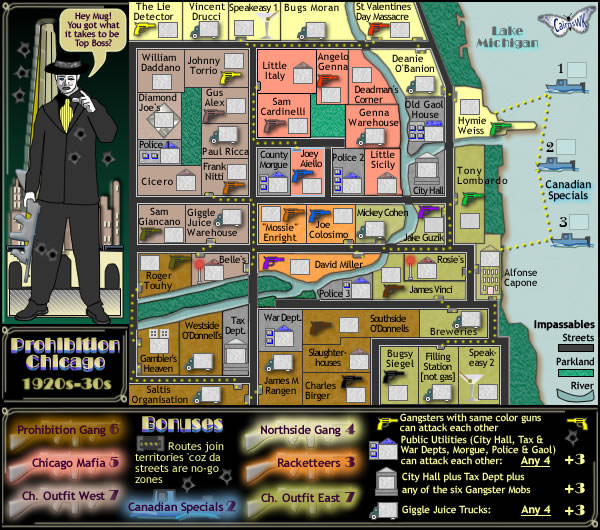
2010-03-06 20:39:33 - lurkerleader: how did i miss city hall... argh
2010-03-06 21:01:09 - mgconstruction: had a lucky drop & good dice on the first turn
2010-03-07 01:19:24 - lurkerleader: i missed police 3?
2010-03-07 01:19:27 - lurkerleader: i need to wake up
2010-03-07 02:21:33 - mgconstruction: what kind of dice you getting lol this is the 3rd game youve turned
2010-03-07 15:28:25 - lurkerleader: im getting ok dice, nothing spectacular yet
2010-03-07 15:29:03 - lurkerleader: my strengths are short game and long game... i flop around turn 4-9
2010-03-07 19:24:09 - mgconstruction: gg
2010-03-08 16:05:03 - lurkerleader: gg