Help
Play States
Play By Clickable Map
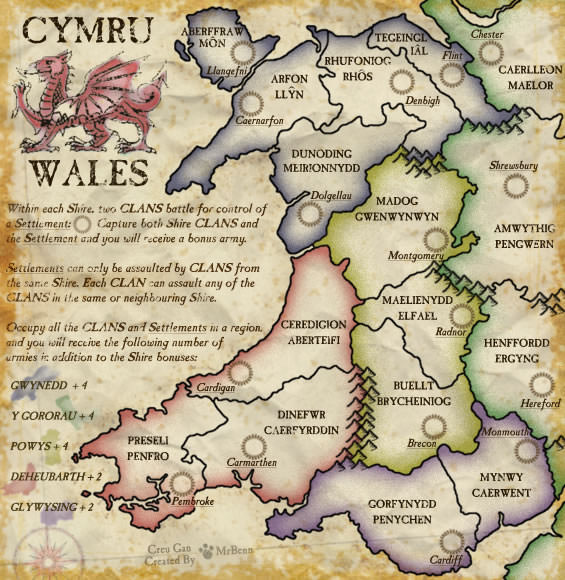
Deploy: Click on territory to deploy, choose number to deploy and click again to make deployment
Assault: Click on a territory to Assault from, then on a territory to Assault (right click to Auto Assault)
Advance: Click on conquered territory to choose to advance, choose number to advance, then click again to advance. Click on conquering territory to advance zero.
Reinforce: Click on a territory to Reinforce from, then on a territory to Reinforce to. Click again to confirm.
Play By Keyboard and Mouse
N Key: Skip to next game, Jump to next game
B Key: Begin Turn
E Key: End Deployment, End Assaults, End Reinforcement
L Key: Later (decline to play spoils)
W,S Keys: Increase/decrease troop quantity (slow)
Q,A Keys: Increase/decrease troop quantity (fast)
Mouse Wheel: Change troop quantity by scrolling over the selected region.
CTRL Key + Click: You can always use CTRL-click instead of the right mouse button.
Middle Click: To advance to next stage (Begin Turn, End Assaults, etc.) click the middle mouse button anywhere on the map.
2011-08-02 16:27:08 - macbone: All right, Dibbun, let's do this!
2011-08-02 16:28:13 - macbone: ouch! not with dice like that! =)
2011-08-03 02:34:09 - macbone: i'm glad this isn't flat rate - allll red
2011-08-03 02:38:10 - Dibbun: lol yeah I'm so used to flat rate that all red makes me cringe, even an in escalating game
2011-08-03 04:16:14 - Dibbun: noooooo
2011-08-03 04:16:15 - Dibbun: so close
2011-08-03 04:16:24 - Dibbun: oh wait
2011-08-03 04:16:29 - Dibbun: didn't even see that region in the south
2011-08-03 04:16:36 - Dibbun: LOL not close at all :P
2011-08-03 04:20:41 - macbone: and then I log in and see i have 4 left! crikey!
2011-08-03 04:27:41 - macbone: gg, Dibbun
2011-08-03 04:27:43 - Dibbun: gg :)
2011-08-03 04:27:50 - macbone: Close one - whoever had a set was going to win it