Help
Play States
Play By Clickable Map
Deploy: Click on territory to deploy, choose number to deploy and click again to make deployment
Assault: Click on a territory to Assault from, then on a territory to Assault (right click to Auto Assault)
Advance: Click on conquered territory to choose to advance, choose number to advance, then click again to advance. Click on conquering territory to advance zero.
Reinforce: Click on a territory to Reinforce from, then on a territory to Reinforce to. Click again to confirm.
Play By Keyboard and Mouse
N Key: Skip to next game, Jump to next game
B Key: Begin Turn
E Key: End Deployment, End Assaults, End Reinforcement
L Key: Later (decline to play spoils)
W,S Keys: Increase/decrease troop quantity (slow)
Q,A Keys: Increase/decrease troop quantity (fast)
Mouse Wheel: Change troop quantity by scrolling over the selected region.
CTRL Key + Click: You can always use CTRL-click instead of the right mouse button.
Middle Click: To advance to next stage (Begin Turn, End Assaults, etc.) click the middle mouse button anywhere on the map.
2011-10-24 12:34:56 - Masli: gl
2011-10-24 12:52:02 - Iberia: hi,gl
2011-10-24 12:54:14 - Iberia: What I have had bad start! :-)
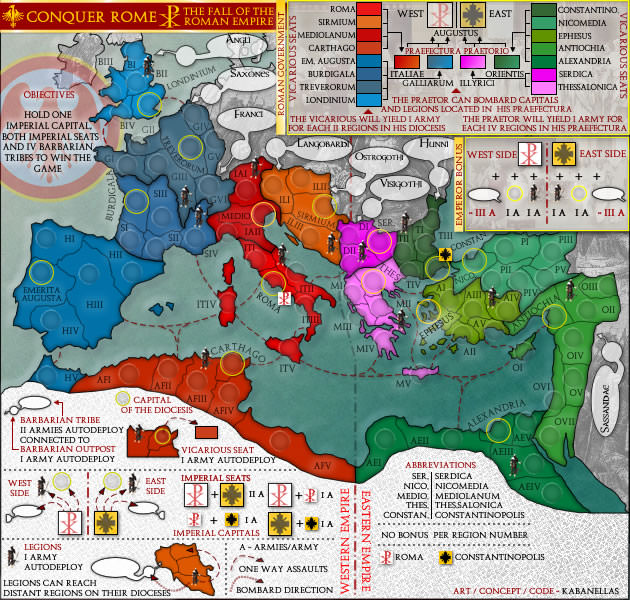
2011-10-24 13:03:33 - Masli: what a strange map....
2011-10-24 13:05:50 - Iberia: I love this map
2011-10-24 13:40:44 - Masli: I really have no clue how this map works, hahahahaha
2011-10-24 13:41:08 - Masli: well, a bit but the bonus is so odd
2011-10-24 13:42:43 - Iberia: The important thing is vicarious
2011-10-24 13:44:31 - Masli: to take as many of those seats as you can ?
2011-10-24 13:48:21 - Masli: just end
2011-10-24 13:48:25 - Masli: I'll make it easy
2011-10-24 14:00:08 - Iberia: thanks