
Go here. Style and common coloring of ink stamps.
http://www.thejapaneseconnection.com/digital_hanko.htm


Moderator: Cartographers

drunkmonkey wrote:I'm filing a C&A report right now. Its nice because they have a drop-down for "jefjef".




drunkmonkey wrote:I'm filing a C&A report right now. Its nice because they have a drop-down for "jefjef".
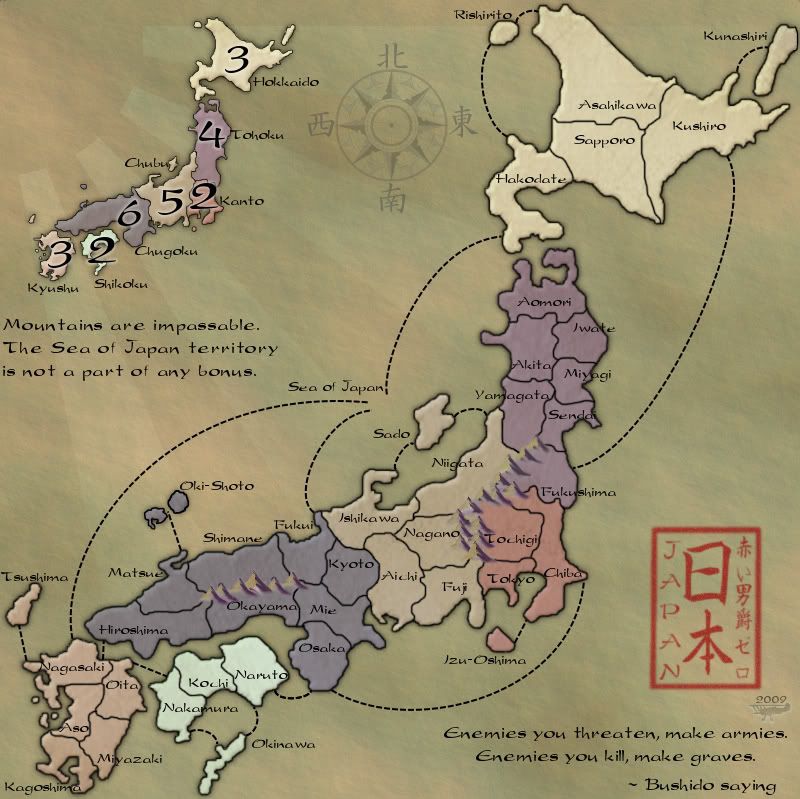
isaiah40 wrote:Can you make the 2 symbols inside the stamp area more like the border of the stamp? It seems to stand out to much, as the border of the stamp looks like a rubber stamp.
If isaiah40 is saying what I think he is, the two large symbols (日本?, I can't tell, I don't have the Japanese fonts on this machine) are too solid, compared to the border of the stamp, which is a little less opaque, a little more diffuse.RedBaron0 wrote:You mean put the 日本 off to the left say, smaller, with a larger "Japan" in the the center?
Yes, thank you ender! That's what I meant. SO sorry I didn't make sure it was described clear enoughender516 wrote:isaiah40 wrote:Can you make the 2 symbols inside the stamp area more like the border of the stamp? It seems to stand out to much, as the border of the stamp looks like a rubber stamp.If isaiah40 is saying what I think he is, the two large symbols (日本?, I can't tell, I don't have the Japanese fonts on this machine) are too solid, compared to the border of the stamp, which is a little less opaque, a little more diffuse.RedBaron0 wrote:You mean put the 日本 off to the left say, smaller, with a larger "Japan" in the the center?

Bevel is out, drop shadow is out. That's easy to fix. Just to be sure, the dashed sea connections you mean for "the lines" or is it the borders you mean?the.killing.44 wrote:Still not a fan of the bevel or the lines—I think you should make them more brush-painted on. The bevel is off with the parchment feel, IMO.
I think I get it... (checks translator) Yeah I kinda do, Photoshop? I'll see what I can do. GIMP I'm using remember.the.killing.44 wrote:For the title area, it's too "perfect." Take a natural brush at ~20px; Spacing: 50%; Scattering: scatter ~150%, count 2, count jitter 100%; Other Dynamics: opacity jitter 50% control off, flow jitter 57% control pen pressure. Duplicate all the layers in the title/sig block, merge them, and hide the originals. Then, on your merged layer, make a vector mask, select all and delete (so it's clear), and draw all around the area, making it look older and faded.
Hopefully that makes sense and looks good.
Grr, damn GIMP. Does it have layer masks? That's the most important thingRedBaron0 wrote:Bevel is out, drop shadow is out. That's easy to fix. Just to be sure, the dashed sea connections you mean for "the lines" or is it the borders you mean?the.killing.44 wrote:Still not a fan of the bevel or the lines—I think you should make them more brush-painted on. The bevel is off with the parchment feel, IMO.
I think I get it... (checks translator) Yeah I kinda do, Photoshop? I'll see what I can do. GIMP I'm using remember.the.killing.44 wrote:For the title area, it's too "perfect." Take a natural brush at ~20px; Spacing: 50%; Scattering: scatter ~150%, count 2, count jitter 100%; Other Dynamics: opacity jitter 50% control off, flow jitter 57% control pen pressure. Duplicate all the layers in the title/sig block, merge them, and hide the originals. Then, on your merged layer, make a vector mask, select all and delete (so it's clear), and draw all around the area, making it look older and faded.
Hopefully that makes sense and looks good.




I have been watching this map right through, and there were a number of comments about the map not quite capturing the Japanese feel, so rather than let the map stall, RedBaron0 gave it a fresh start. I too thought it was a shame to flush all that work for a reason like that when so many Japanese elements had been eliminated due to other objections, but I admire the Baron's ability to persevere.lt_oddball wrote:dude ..wdf?
I thought the colorful map with flag was ready to be launched ??? ..and now you revert to a bland map ?
Whatever happened to the "beware of/for colourblind people" criterium ?
I can imagine that you think of shogun times to implement in the map..but..you throw months of work away...
Who talked you into this change ??
You're like my brother , always after "perfection" , planning and changing things all the time but never finishing the product to release.

That actually sounds kinda sweet, if it's done well. Too late for this map, though.Raskholnikov wrote:Hahaha... good point well made!! I think the Foundry views "theme" as a function of looking back to a historical "tradition". A Japan map based on robots, neon lights and electronics would probably receive little support.

I've got some options and GIMP does have layer masks. You didn't answer my question about the lines though:the.killing.44 wrote:Grr, damn GIMP. Does it have layer masks? That's the most important thing
I just want to be sure.the.killing.44 wrote:Still not a fan of the bevel or the lines—I think you should make them more brush-painted on. The bevel is off with the parchment feel, IMO.
RedBaron0 wrote:Bevel is out, drop shadow is out. That's easy to fix. Just to be sure, the dashed sea connections you mean for "the lines" or is it the borders you mean?



Agreed. Someone get on that.Evil DIMwit wrote:That actually sounds kinda sweet, if it's done well. Too late for this map, though.Raskholnikov wrote:Hahaha... good point well made!! I think the Foundry views "theme" as a function of looking back to a historical "tradition". A Japan map based on robots, neon lights and electronics would probably receive little support.
drunkmonkey wrote:I'm filing a C&A report right now. Its nice because they have a drop-down for "jefjef".
Technically it's a "falling sun" (as the lines come down instead of up), but I think we can let it pass...RedBaron0 wrote:Well.... the corner isn't empty, it has the sun in it. I think it'll make the symbol of the "Rising Sun" (for lack of a better term) different, and not what it's intended to be.