Your SOC Training Academy How-to Guide for World Domination

The SoC Training Academy and its Training Grounds provide basic training for new and old members looking to enhance their game strategy. "Train a Cook today, lose to a Sergeant tomorrow"

Moderator: Academy Team

Forum rules
Please read the Community Guidelines before posting.
Locked
User avatar
macbone
Posts: 6217
Joined: Wed Jun 03, 2009 8:12 pm
Gender: Male
Location: Running from a cliff racer
Contact:

Welcome

Post by macbone »

Welcome to SoC Training!

In an effort to help you get the most of your SoC membership, we have compiled some information that should get you started. The following information will help you greatly as you begin your Conquer Club career or sharpen your Escalating skills, and you don’t have to read everything now, but you should skim through the following material now. Later, as your training begins in earnest, you should go back through and read in further detail.

Of particular importance to new students is Section 2, Basic Training.
User avatar
macbone
Posts: 6217
Joined: Wed Jun 03, 2009 8:12 pm
Gender: Male
Location: Running from a cliff racer
Contact:

What is the SoC, and how can I join?

Post by macbone »

What is the SoC?

The SoC Training Academy, or Society of Cooks Training Academy, is made up of players just like you who teach other CC players how to play Escalating and Team games. We were founded by Wacicha and Gloryordeath, and the principles they established still live on in our handbook, the First Four Moves.

The current head of the SoCTA is dhallmeyer, and you can contact him at any time with any questions you may have.

[spoiler=SoC Staff and Graduates]The SoC Academy Team:

Dhallmeyer - The Huntsman
Headmaster

ElricTheGreat - Stealer of Souls
SoC Tournaments/Terminator and Standard Teaching

Charle - The Prospector
Terminator and Standard Teaching

tamaynet - Field Engineer
Terminator and Standard Teaching


Hall of Honor:

Wacicha - The Wiseman
The Big Boss and Founder - On Leave but still Lurking

Glory or Death - The Oyuze Sage
Retired with Honors

Mpjh - The Mentor
Perstare et praestare

The Staff:

Terminator/Standard Games Active Teachers

celliotti
charle
dhallmeyer
elricthegreat
JJ41375
Silly Knig-it
tamaynet
TheGreys

Team Games Active Teachers

aad0906
Charle
dragon dor
lokisgal
macbone
osman76
Stotzi
Extreme Ways


Over the years, many Conquer Club players have selflessly given their time to train the next generations of CC. Our former teachers are either taking an extended break or have moved on to other pursuits, but without them, the SoC wouldn't be what it is today.

Resting & Former Teachers

50 eggs
Ardan
asbks
b00060
Bruceswar
Betiko
Captn B
chapcrap
chris.yfc
Commander9
conde180711
Conquistador Sid
coolhand_79
Count Belisle
craze_boi
cyberaddict
cy22
Deli
denise
denthefrog
dr.lucas
dyrtydog
Edgron
evskimo
general roy
grifftron
hanksy
happy2seeyou
hydebass
Industrial Helix
imacamper
Iron Butterfly
Iron Maid
JoshyBoy
julius valentine
jwhite07
kalano sanchin
katyrush
killmanic
kiwi3
Koganosi
kratos644
Leehar
lilrvrgrl
logasklucyl
L M S
Koganosi
matroshka
MEK
Mudpuppy
osmanpasha
pascalleke
Phatscotty
pirlo
ptlowe
qwert
rdsrds2120
scario67
shaneback
slownumbers
slowreactor
smegal69
sniper08
stef_duracell
Streaker
TheMissionary
thephenom
therev1957
wacicha
wisemanpsemc

Retired teachers

gloryordeath
mpjh
jcarter1
lt.futt
OldRisky44
macbone


The Graduates[/spoiler]

How can I join?

Joining the SoC is easy. For our basic training, go to the main SoC Training Grounds forum, look for the latest thread that says "Sign up here for training," and click on it. (You may see older threads with the title, but they should be locked). Add your name to the list, and we'll notify you when it's time for your training to begin.

If you're interested in SoC team training, go to the thread that says "Sign up for team training," click it, and add your name there.

Note: There is a bit of a wait for both basic and team training, so watch for your PM.
User avatar
macbone
Posts: 6217
Joined: Wed Jun 03, 2009 8:12 pm
Gender: Male
Location: Running from a cliff racer
Contact:

Your first day in training

Post by macbone »

Your first day in training

Upon joining the SoC you will receive a link to your Training Field, the classroom where you'll post games and receive feedback from teachers. Once you are assigned a Training Field, you should introduce yourself in the Welcome thread.

Once you've done that read through all of this Guide, which will help you get your bearings.

In particular, read through Your First Four Moves several times, and periodically go back and re-read it. The F4M is our strategy textbook that we teach from, and you should be very familiar with it before you even start a game.

Then read a few of the other student posts in your Training Field, looking them over to get a feel for how the teaching works.

We highly recommend that you add all active Escalating teachers to your friends list. That way, if you're running out of time to take your turn, you can quickly see which teachers are currently online and PM them directly for help.

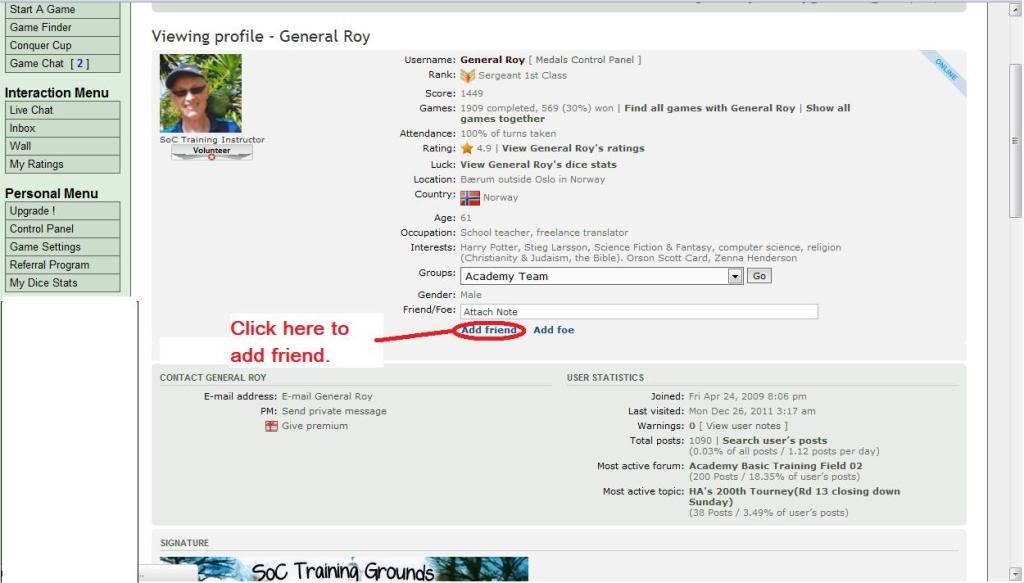
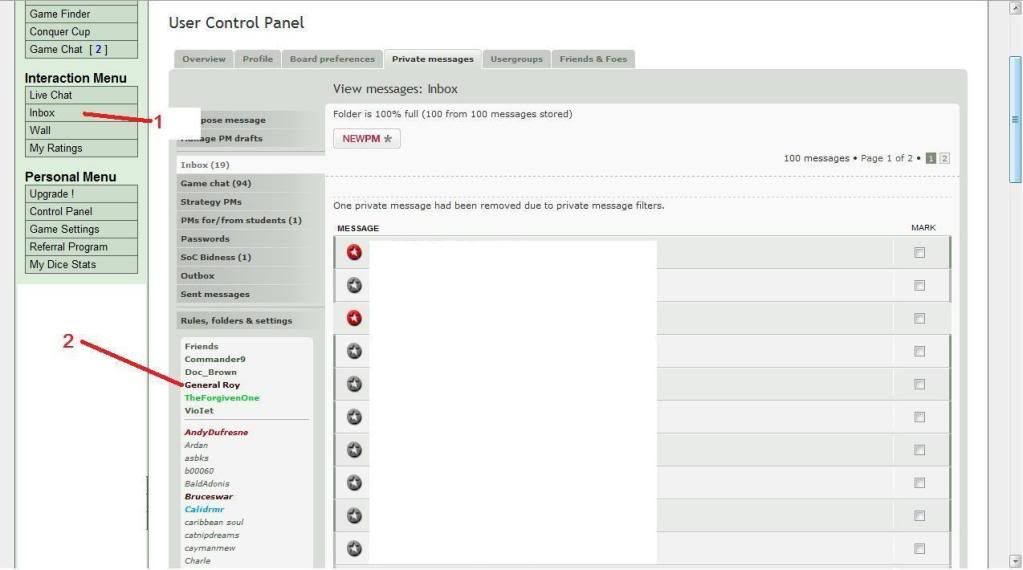
[spoiler=How to add someone to your Friends list]1. Click on that player's profile. You can either click on the teacher's name directly hotlinked in this Guide or click on a player's name in chat.

2. Once you're looking at that player's profile, you can click "Add Friend" to add that player to your Friends list.

Image

3. Then, to check to see if that player's online, you can click on your Inbox, and your friends who are online will show up at the top of your Friends list.

Image[/spoiler]
User avatar
macbone
Posts: 6217
Joined: Wed Jun 03, 2009 8:12 pm
Gender: Male
Location: Running from a cliff racer
Contact:

How to join games and avoid players in your Training Field

Post by macbone »

How to join games and avoid players in your Training Field

We teach games on these settings:
Players: 6 or 7
Game Type: Terminator or Standard
Map: Classic
Initial Troops: Automatic
Play Order: Sequential
Spoils: Escalating
Fog of War: No
Round Length: Casual

Links to find SoC games: SoC Basic Games

The passwords for the games will be listed in the game title, but generally the password is "soc training".

Students, before you join a game, please check to make sure no other students from your Training Field are in that game.

[spoiler=How to find games using Game Finder]1. Click "Game Finder" on the left-hand menu.

2. Tick "Waiting for Players."

3. Choose "SoC Training Grounds Basic Terminator, SoC Training Grounds Basic Standard, or SoC Training Grounds Basic Team."

4. Click Submit.

Image[/spoiler]
The easiest way to check to make sure no one in your Training Field is in your game is to find a game and then click on each player's name who is already in the game. When you arrive at his/her wall, click the GROUPS drop-down menu. If you don't see your Training Field number, you are safe to join games with this player. Repeat this process for each player in the game.

[spoiler=How to find out if a player is in your Training Field]Image[/spoiler]
User avatar
macbone
Posts: 6217
Joined: Wed Jun 03, 2009 8:12 pm
Gender: Male
Location: Running from a cliff racer
Contact:

Your First Four Moves - Escalating Strategy in a Nutshell

Post by macbone »

This following strategy was first written by Wacicha and Gloryordeath and developed by them and other early SoC teachers and players:

Your First Four Moves (F4M)

Introduction

These are some guidelines to help you learn how we play terminator escalating games. Once you master these concepts, you'll be able to play almost any other game type. Keep in mind that you will not win every game you play with these tactics: even the best among us only win 25-30%. What we have learned is that we can make 1-2 kills per game (winning 25% or so) and that will be enough to see your score move up and your fun increase.

Basic Principles
Conserve your troops. Escalating games are about spoils and troops, and the relationship between them. You do not want to be in a position of having lots of spoils, but few troops; this will make you a target.

Don't try for bonuses. Since this is escalating, spoils value will quickly outweigh a region bonus; so don't spend your troops wastefully trying to take and hold one. EXCEPTION: If you drop into 3 out of 4 territories in South America or Oceania, try for it; but don't spend more than one turn trying or you'll fall behind the pack. DO NOT, under any circumstances, try to take and hold North America, Europe, or Asia; Africa is usually off limits too, but can sometimes be done by a better player.

Build 3-5 stacks around the board. Escalating spoils means that if you can kill someone, you get their spoils, and can potentially cash in to get even more troops and then target another player for their spoils. Also, having stacks that are spread out makes you harder to eliminate, at the same time and giving you more mobility around the board when you want to eliminate someone. If you have several territories that are connected, bring them all into one spot. This gives you more striking power and reduces the chance of people taking them out.

Take easy spoils. Attack only if you have at least 4 against 1. This gives you the greatest odds of winning. As noted above, don't spend too much for a small reward; usually you will only roll twice per turn. If you don't win in those two rolls, end attacks. It is not worth weakening yourself in the early game to gain spoils.

Always know who the weakest players are and whether or not you can eliminate them.

Now, remembering these basics, here's what your first four moves should look like in a normal game.

Move #1
Deploy only. Survey your drop and determine which territories you want to keep and which ones you want to leave alone. Do not make any attacks this turn. Consolidate any groupings into single stacks. You should have the beginnings of your 3-5 working stacks now. EXCEPTION: If you drop 3 out of 4 in South America or Oceania, deploy all troops there and try to take out the 4th spot. Then in round #2 you will be doing what is described above.

Move #2
Look for prime positions to move your stacks into; begin looking as well for easy spoils to take along the way. If there are no easy spoils available, don't sweat, you're not going to be in any trouble if you don't get a spoil here.

Prime territories are places that have lots of connections and few bottlenecks; in an ideal game, you would have a stack in NA, Europe, Africa, and Eastern Asia. Below is our prioritized list of territories, but it is subject to your other placements. You don't want your stacks to be too close together or to hold ALL the prime territories because then you will be an easy target.

[spoiler=Ordered list of territories best to worst by continent]NA: Chicago, Edmonton, Vancouver, Havana, Montreal, LA, New York, Anchorage, Mexico City.
Europe: Moscow, Istanbul, Berlin, Reykjavik, Madrid, London, Stockholm.
Africa: Nairobi, Dakar, Lagos, Cairo, Cape Town, Johannesburg.
Asia: Dubai, Hong Kong, Novosibirisk, Delhi, Manila, Magadan, Beijing, Astana, Bangkok, Mumbai, Yakutsk, Tokyo.
SA: Sao Paolo, Bogota, Lima, Buenos Aires.
Oz: Jakarta, PM, Perth, Sydney.

This is strictly from an offensive mindset. There will be times when you want to have Buenos Aires or Johannesburg as a defensive stack that is hard to get to for the other players. Also sometimes it is necessary to hold a choke point such as Bangkok, Magadan, or Reykjavik to prevent other players from getting into certain areas where they could make a kill.[/spoiler]

Move #3
Move 3 looks a lot like move 2. At this point, getting a spoil starts to be a little more urgent if you haven't already earned one. Continue working toward key territories.

When make your deployments, put 2 on the territories you'll attack from and 1 somewhere else. This way you will not reduce your stack size when you attack twice for a spoil, but you still give your other stacks a chance to grow.

Move #4
Now we should be able to see what the other players are up to. Before each turn you need to check and see who is the weakest player and whether or not you can take them out. Players who are fighting over bonuses will eventually weaken themselves to the point that they are an easy target for someone playing our style. Remember, we're not looking to win the game all the time, just to make a kill or two so don't be afraid to strike. There is an add-on called BOB that you can get in the tools section of the forum that will greatly help you in knowing troop strengths.

Moving Into the Mid-Game - Move #5 and beyond
After this, the sequence repeats itself until you are strong enough to make a kill. Continue to look for strong points to build on; and keep track of weak players, leaving yourself an avenue of attack for when the time is right. Once the spoils value is above 12 you can consider risking more than 2 troops in pursuit of another spoil. Keep an eye on your strengths especially as they relate to opponents strengths and weaknesses.

"There is nothing sweeter than logging in to see that you are set up perfectly to take someone out." -- Gloryordeath
User avatar
macbone
Posts: 6217
Joined: Wed Jun 03, 2009 8:12 pm
Gender: Male
Location: Running from a cliff racer
Contact:

How to post games in your Training Field

Post by macbone »

How to post games in your Training Field

After you've joined a game, wait until it's your turn to play. When it is your turn, open two tabs in your browser.

NOTE: You will want to allow as much time for teacher response as possible. If you cannot wait for an answer, continue with posting, but go ahead and take your turn and ask for a critique. If you don't have much time left to make your move, you can also check the teacher list (found at the SoC Staff and Graduates list and Terminator/Standard Games Active Teachers usergroup list) to see if any teachers are online and available to give you feedback.

In one tab go to your game, in the other go to your Training Field.

Study the map, noting your troop strength and positions compared to all other players. Determine who is weakest and who is strongest, and where you fit into this equation.

Then, in your Training Field tab click “New Topic”. The game form will appear (see How to use the game form and why). Fill out the game form, and when you’re done, click “Submit.” Make sure to click the “Subscribe Topic” check-box at the bottom of your post.

Wait for a teacher to respond, and if you need more help, pm any of the teachers.

You should create your first post in your new thread as soon as you can WHEN IT IS YOUR TURN. You will have 24 hours to take your turn, so the sooner you can post your ideas, the more time the teachers will have to respond.

Posting "Thank you" or "It's not my turn but..." is not recommended. The teachers are watching 19 different Training Fields and it takes a certain amount of time to locate a student post, evaluate the thread, and formulate a response. Non-productive posts eat up the valuable time that the teachers have volunteered to use to help you. If you want to say thanks or have a general, game non-specific question, feel free to post in the "Training Grounds," on a teacher's wall, or via PM.
User avatar
macbone
Posts: 6217
Joined: Wed Jun 03, 2009 8:12 pm
Gender: Male
Location: Running from a cliff racer
Contact:

How and why to use the game form and why

Post by macbone »

How and why to use the game form

The game form:

Link to Game: [game]xxxxxxx[/game]

Spoils to turn in:

Next spoil set value:

Do you have a set of spoils?

Your Plans:


Link to Game

The first thing you need to do is to copy your game number and paste it OVER the "xxxxxxx" so that the link will work correctly. Copy the id number from your game (you can find it at the top of the game or at the end of the web url in the browser when you're looking at the game). Delete the Xs and put the game number in their place. Remember you can use the "Preview" button to check that your game link works and your post looks good to you before you "Submit".

A good game link is crucial to your teachers as it helps them find your game and advise you on your move quickly and accurately.

Some of the most common mistakes involving the game link are:

- accidentally deleting one of the brackets... [game1234567[/game]
- inserting a space between the tags... [game] 1234567[/game]
- leaving the "xxx"... [game]xxxxxxx1234567[/game]

When properly done your game link will look like this... [game]1234567[/game]


Spoils to turn in:

This should be a list of your actual spoils, and it should look like this:
r:Chicago, b:Montreal, r:Berlin

In escalating terminator games, the spoils are THE key to winning, so an accurate understanding of your spoils is crucial for your teacher to give you the best possible advise.


Next spoil set value:

The value of the next set can be found in your action menu...
------------------------------------------------------------------------------------------------------------
Waiting for your next turn... jump to your next playable game.
Map Inspect:
My Spoils ([bracketed] if owned, next set worth 4 troops): Spoilr:Northern Waste Spoil[b:Marillo] Spoilr:Straits Spoilg:Wiberg [show / hide teammate spoils]
-------------------------------------------------------------------------------------------------------------

The spoils will progress as follows: 4,6,8,10,12,15,20,25,30 and so on by 5 until the game is over.

Do you have a set of spoils?
Your answer should be "yes" or "no".

Not answering this question can cost you the game, so please pay attention here.

Your plans:
Study the map, think about your plans and tell us what you are thinking. If you are confused, unsure, or have questions, tell us that. The more info you give us the more help we can provide.
User avatar
macbone
Posts: 6217
Joined: Wed Jun 03, 2009 8:12 pm
Gender: Male
Location: Running from a cliff racer
Contact:

Graduation Requirements

Post by macbone »

Want to graduate from the Academy? Here's what you need to do:

Am I a Graduate?

Want to graduate from the Academy? Here's what you need to do:

    #1: Post at least 5 games for help in your Training Field, with no more than 2 at the same time.

    #2: Achieve rank of Lieutenant, while earning 25 kills and 5 victories in Training Grounds-style games since joining the Academy.

      --Kills accumulate for ANY kill in a Term match AND your personal kills when WINNING a Standard game
      --Victories are awarded for ANY of the games won by the student in either the Term or Standard matches.
      --Our Settings: 6-7 player, Classic Map, Standard or Terminator, Escalating, Unlimited Forts, Sunny, Casual, Auto Deploy.
    #3: Complete at least 10 Training Grounds style games since joining.

    #4: Complete 2 Final Exam games against the staff. (Note: You don't have to win, just demonstrate that you know what we teach)

    #5: Graduates must demonstrate a good attitude and a willingness to learn. All teachers have input on potential graduates' behavior.

Use the game finder to research your games. Then post a reply in this thread in the main Training Grounds forum with the game numbers and details.
Dhallmeyer wrote:Example: [game]13907366[/game] Standard, 5 kills, win.
[game]13823998[/game] Terminator, 4 kills, win.
[game]13907440[/game] Terminator, 1 kill.
[game]13907434[/game] Standard, 1 kill, no win. Does not count.
[game]13823848[/game] Standard, 3 kills, win.
For these 5 games, I would have 3 wins and 13 kills toward my graduation.
User avatar
macbone
Posts: 6217
Joined: Wed Jun 03, 2009 8:12 pm
Gender: Male
Location: Running from a cliff racer
Contact:

FAQ

Post by macbone »

Frequently Asked Questions for SoC and Terminator games.

From Gloryordeath:

What is a sticky?
[spoiler]A sticky is a post found at the top of a forum page. It is marked with a ! instead of a star like regular posts. Stickies usually contain important or useful information, contests, and links and info that is often used.[/spoiler]

How do I find Society games to play that I can post in my Training Field?
[spoiler]UPDATE: You can either follow the method below or click on this handy link for Term and Standard games to post in your Training Field: http://www.conquerclub.com/player.php?s ... so=&page=1

1. Click "Game Finder" on the left-hand menu.

2. Tick "Waiting for Players."

3. Choose "SoC Training Grounds Basic Terminator, SoC Training Grounds Basic Standard, or SoC Training Grounds Basic Team."

4. Click Submit.

Image[/spoiler]

How do I post a game in my Training Field to get started?
[spoiler]Go to your Training Field's main page and click on the New Topic button.
A game form will appear automatically. The game form appears as soon as you start a new thread in your Training Field. This form has been carefully crafted to help you (the student) help us (the teachers) to help you.

You should create your first post in your new thread as soon as you can WHEN IT IS YOUR TURN. You will have 24 hours to take your turn, so the sooner you can post your ideas, the more time the teachers will have to respond.

Posting "Thank you" or "It's not my turn but..." is not recommended. The teachers are watching 19 different Training Fields and it takes a certain amount of time to locate a student post, evaluate the thread, and formulate a response. Non-productive posts eat up the valuable time that the teachers have volunteered to use to help you. If you want to say thanks or have a general, game non-specific question, feel free to post in the "Training Grounds".

This is the game form:
Link to Game: [game]xxxxxxx[/game]

Spoils to turn in:

Next spoil set value:

Do you have a set of spoils?

Your Plans:


The Game Link

The first thing you need to do is to copy your game number and paste it OVER the "xxxxxxx" so that the link will work correctly. Remember you can use the "Preview" button to check that your game link works and your post looks good to you before you "Submit".

A good game link is crucial to your teachers as it helps them find your game and advise you on your move quickly and accurately.

Some of the most common mistakes involving the game link are:

- accidentally deleting one of the brackets... [game1234567[/game]
- inserting a space between the tags... [game] 1234567[/game]
- leaving the "xxx"... [game]xxxxxxx1234567[/game]

When properly done your game link will look like this... [game]1234567[/game]

Spoils to turn in:

This should be a list of your actual spoils, and it should look like this...
r:Chicago, b:Montreal, r:Berlin

In escalating terminator games, the spoils are THE key to winning, so an accurate understanding of your spoils is crucial for your teacher to give you the best possible advise.


Next spoil set value:

The value of the next set can be found in your action menu...
------------------------------------------------------------------------------------------------------------
Waiting for your next turn... jump to your next playable game.
Map Inspect:
My Spoils ([bracketed] if owned, next set worth 4 troops): Spoilr:Northern Waste Spoil[b:Marillo] Spoilr:Straits Spoilg:Wiberg [show / hide teammate spoils]
-------------------------------------------------------------------------------------------------------------

The spoils will progress as follows: 4,6,8,10,12,15,20,25,30 and so on by 5 until the game is over.


Do you have a set of spoils?

Your answer should be "yes" or "no".

Not answering this question can cost you the game, so please pay attention here.


Your plans:
Study the map, think about your plans and tell us what you are thinking. If you are confused, unsure, or have questions, tell us that. The more info you give us the more help we can provide.[/spoiler]

Why do you teach mainly Terminator style games?
[spoiler]Because it allows the students to earn points in games without having to win the whole game. As a student learns the basic skills their kills will go up and this in the long run equals to playing a better end game such as standard style play.[/spoiler]

What maps can I post for help on?
[spoiler]Only the Classic map. For now... ;)[/spoiler]

Do you also have a Team game class?
[spoiler]Yes we do, and any SoC student who has completed at least 5 Terminator games can post in the registry for team games in the general Training Grounds forum.[/spoiler]

If no one posts in my game to help what should I do?
[spoiler]NEVER MISS YOUR TURN! The best thing you can do is be sure to post your games with as much time for us to get to them as you can. If time is running out for you or your game look on line fore a teacher or two and pm them. We will help you. Try to pick ones not in the game. Also, by adding all the teachers to your friends list, you can quickly see if a teacher is online. If you have no one to help play the turn as best you can, follow the first four rules and the basic strategy contained in them.[/spoiler]

What if I a student from my class and I are in the same game?
[spoiler]Contact any staff member, particularly macbone or dhallmeyer, so we can move one of you to a different class so no one can see the moves you plan.[/spoiler]

Can I play with teachers?
[spoiler]Yes, we make games often so students have games to easily choose from. Just add the teacher's or teachers' names to your Subject when you make your new topic so those teacher know not to read that game's posts.[/spoiler]

Can I make my own games?
[spoiler]Yes, just be sure you make them on a classic map with the settings of Terminator, 6 or 7 player, sequential, escalating, unlimited fort, 24 hour turns, no fog.[/spoiler]

Can I post fog of war games?
[spoiler]NO! We can't see anything in fog games, not even your troops.[/spoiler]

Why should I not try to take a bonus?
[spoiler]Because in Term games it is troop numbers and placement that counts. Going after bonuses most of the time leads to two things: 1) you lose half or better of your troop strength and might not even get it and 2) even if you do get it you lose strength in other areas of the map and as such lose the ability to attack any ones placements in other parts of the map.[/spoiler]

Can a new recruit play Terminator games?
[spoiler]Only in private games with password protection. Get a hold of us and we will set up games for you to play with other students. You do not have to be a silent student in SoC. We are happy to help you become an active member of the class.[/spoiler]

Can I only play the games you say?
[spoiler]No, but we will only help in games we support. The more effort you put into the program, the more you get out of it. So give it a good try and learn all you can, then use the new skills you learned to explore and play all you want in CC.[/spoiler]

Why don't you teach other settings/maps?
[spoiler]We have found the the settings and maps we use to be the most effective in teaching what we teach. Plus we will not teach anything we don't feel 100% confidence in teaching.[/spoiler]

Can I teach in the SoC?
[spoiler]All our teachers teach our way. The ability for a number of teachers to post in the same game and not miss a beat from one teacher to the next is a must. All teachers must go through games as a student our way and pass our training program for new teachers. All teachers are screened by Iron Butterfly and the rest of our staff and all aspects of CC use are looked over. All requests should be placed with dhallmeyer.
Students that go through our program must reach and hold at least a LT rank for a short time to establish that they fully know the strategies we teach. At this time they may enter the teacher training program.[/spoiler]

Can I play games against other players in my Training Field if none of us post the games for help?
[spoiler]Yes, if no one posts that game for help, then no one will be temped to cheat and take a peek at what moves the other player plans next turn. But be sure ALL members from your class that are in the game are OK with not posting for help at any time while the game is still going on.[/spoiler]

What does it mean to play "balanced?"
[spoiler]If you over attack you lose troop numbers which are very important early on in the game. If you are too defensive then you tend to lack spoils later in the game which are very important.
Also you need balance on the map. You will learn to manage your drop (your starting positions) and gain the ability to move to other areas during the game. Playing for a bonus often leaves you weak in other areas of the map even IF you mange to gain and hold it. So most times it should be avoided.[/spoiler]

Should I leave 2's behind when I advance?
[spoiler]No. In term games this gives you no advantage. In fact it can even hurt you in the long run. Having an easy place to card from gains you cards as well as it gives other players cards that you can take from them as you make your kills. Your best defense is having high troop strength and being well spread out on the map.[/spoiler]

Why should I leave spots for easy cards in Escalating?
[spoiler]Card spots benefit everyone, including you. Card spots allow easy cards to be taken, giving everyone the cards they need to progress in a game. You might consider blocking players from getting cards, but as cards become very important in the later stages of the game, most people will do anything to get a card, including hitting stacks of 3 or more. When players hit your small stacks, they not only waste their own troops but yours as well. In addition, if your opponents have cards, you have a better shot at eliminating them and re-cashing for a sweep. In short, leaving 1s for card spots is a win-win for you, but blocking those same spots is a lose-lose for you and everyone else.[/spoiler]

Why is it poor tactics to use all my forces to grab and hold onto a continent bonus?
[spoiler]If you begin with three of the four territories on one of the small continents, then it may be a good idea to try to secure the bonus. Otherwise, deploying all your armies in one bonus area makes you weaker across the rest of the board, and you become easier to eliminate once players begin cashing cards. Early in the game, an extra +2 troops per turn can be beneficial, but later in the game, when players are trading spoils for 8, 10, 12, or 15 armies, the +2 from the continent is insignificant.

Additionally, in securing your bonus, you will weaken the other players in that continent, making it easier for someone else to take them out. A better strategy is to build up a block to protect those other players (if they themselves are not trying for the bonus) so they are harder to take out in later rounds. By doing so, you can more easily eliminate them yourself.[/spoiler]

Why did a player in may game not follow the First Four Moves?
[spoiler]SoC Training games are open to all players, and most games have a mix of students, teachers, and players from the general CC population. As such, not everyone plays by our strategy. While this can be frustrating to a student, being exposed to other styles of play can help a student learn how to counter those strategies.[/spoiler]

Is it ok to attack on the first round for a spoil if the territory I'm attacking only has 1 troop on it?
[spoiler]So, even though the tert only has 1 on it, you wouldn't attack it for a card on the first turn?[/quote]

Eh, it depends. There's no rush toward getting the first set and cashing for 4, so you don't have to beat the other players to get your set. On the first turn, since the terts are randomly distributed, you usually need to spend time building up stacks in key areas. Only go for a card on the first round if you have great forts across the board. Even then, think about holding off and waiting until your next turn to card.[/spoiler]


Terms: Armies, Troops, Deploy, Mid Turn Deployment, Fort, Soft Attack, Card, Easy Card.

Armies: At the start of each turn the armies you receive which you place on your territory or territories on the map.

Troops: = Armies

Deploy: To place given Troops/Armies on the Board/Map.

Mid Turn Deployment : Troops received from killing another player and taking their cards. Their cards plus your cards must equal 5 or more to cash mid turn. You can cash in as many sets as you hold. Ex. You hold 6 cards. 3 blue and 3 green. You can cash BOTH sets. These troops can then be used to continue your attack.

Fort: To move or re-enforce one of your territories with troops from another one, or more, of your territories.

Soft Attack: To try to gain a card through an attack without losing many troops. Most times no more than 2.

Card: Card=spoil. An old board game term some of us can't let go of.

Easy Card: Taking a card from a place of little resistance i.e. attack a 1 not a 3 to try to lose less troops in gaining a card.

Card Spot: A territory that two or more players take turns attacking and leaving a 1 behind for an easy card.

Bonus Monkey (BM): A player who throws all his or her troops into taking over a continent bonus. Extremely dangerous. Approach with extreme caution, preferably with a two-by-four and a net.

Classroom: Your Training Field.

User avatar
macbone
Posts: 6217
Joined: Wed Jun 03, 2009 8:12 pm
Gender: Male
Location: Running from a cliff racer
Contact:

Useful Add-ons - BOB

Post by macbone »

How to Install BOB (and why you should)

BOB is an excellent add-on for Firefox users that can be of great benefit to CC players. It provides some interesting stats and allows you to take snapshots of the board in Fog of War games so you can remember where players are. The following two posts detail how to install BOB and some good add-ons for it.

To browse available add-ons: Available Tools/Enhancements Forum

BOB has several nice features. One feature that is particularly useful in games with fog of war is the snapshot, which lets you save what the board looks like at that time. You can take a snapshot at the beginning of a game, and as territories go foggy, you can call up the old snapshot to help you guess where players might be. A link to each snapshot is saved in game chat and automatically marked private.

Another very useful feature of BOB is its key to which territories border, one-way attack, bombard, or are bombarded or one-way attacked by other territories. The Classic map only features regular attacks, but some maps can be quite complicated, and this feature can help you understand and better plan your attacks.

Yet another nice feature of BOB is its description of which territories make up a continent bonus. if a player currently owns a bonus, BOB will show list the bonus, and in a game, you can click "Map Options," go down to Text Map, and select Standard to get a list below the map of all the bonuses and the territories that make up each bonus.

BOB has other useful features, as well, which you can play around with. You'll need either Firefox or Google Chrome for BOB, and if you use Firefox, you'll need a script called Greasemonkey.

The main BOB thread

How to install Firefox and Greasemonkey for BOB: How-to Guide

If you already have Firefox and Greasemonkey, you can click here for BOB: Get BOB

[spoiler=BOB Overview from macbone]When you look at a game in BOB, you'll see a row of buttons at the top. These are used for snapshots. Clicking the first button saves the image you can see at that time and creates a link in game chat, usually as a private line. It's very useful for fog games to remember what territories you've previously uncovered. Fog games are a lot harder without it. The second button, "Take a Snapshot," saves the snapshot to the BOB Menus under Snapshots if you don't want it cluttering up your game chat. (I prefer to take the snap in chat, especially in team games, since everyone with BOB can see the snap if they click the link.)

You can click on those links in game chat to look at the game as it appeared at that time. You can click the last button, "Show Differences," to see what's different compared to the current view of the board. "Revert to Live" forces the view to refresh to the current view, which will also happen if you wait a few seconds.

You can also use it in sunny games, just to get a sense of the flow of the game, see who had stacks where, that kind of thing.

BOB will also tell you which territories border, bombard/are bombarded, or one-way assault each other.

On the map, two horizontal lines represent the territories that territory can mutually attack each other. If these territories are conquered, the attacker advances one or more troops into the conquered territory.

Territories with one vertical line on the left and two horizontal lines above and below can be one-way attacked from the selected territory. Territories with one vertical line to the right and two horizontal lines above and below can one-way attack that territory.

Territories with one horizontal line below and two vertical lines on either side can bombard that territory. A player may not advance armies into a territory that can be bombarded. If all a player's troops are eliminated, the territory reverts to a neutral 1. Territories with one horizontal line above and two vertical lines on either side can be bombarded from that territory. Territories with two vertical lines on either side can mutually bombard the territory.

You'll also see a textual representation of this information below the map when you hover over a territory.

Note: BOB does not indicate which territories are killer neutrals. Killer neutrals revert to the original number of neutral troops the territory begins the game with if it is held by one player for one full turn.

OK, next, if you hover your cursor over an individual player on the player's list, you'll see that player's territories. (I'm not sure if this happens without BOB.) If you hover your cursor over the Team name (Team 1, Team 2, etc.), you'll see the territories each team holds.

If you hover your mouse over each individual spoil, that territory will be highlighted on the map. BOB will also highlight each spoil on the map when you have spoils to turn in.

Under the player list, if the map has an objective, the objective will be listed along with the territories that comprise it. A player can win a game by holding an objective for one round. For instance, if a map has Saint Petersburg and Washington DC as its victory objectives, they will be listed here. If the territories are currently held, they will show up as that player's color.

BOB also includes a second table of statistics under the CC statistics. The player's strength is a mix of territories controlled and troop numbers. The Last Bonus column is taken from game log information and shows at a glance what a player's deploy was last turn (I don't think this includes automatic deployment). You can check the game log to see exactly how many different bonuses the player had.

Troops due is the troops from your number of regions + auto deployments + continent bonuses. So, if you have 15 terts (so 5 troops), an autodeploy of +1, and a region +3 bonus, this would show 5 + 1 + 3) = 9, although you'd only have 8 available to deploy (the autodeploy is deployed, well, automatically).

Spoils estimate calculates on average how many troops a player might be receiving from cards on flat rate or escalating.

Zones lists any bonuses you currently hold and any bonuses that you can see that your opponents currently hold. (Always check Last Bonus, though - if a player has 8 troops but has a Last Bonus of 5, then they're holding a bonus somewhere.)

Now, the BOB Menu.

Map Options controls how you view the map. You can adjust the opacity and the circle whiteness, but I find the Text Map option most useful. The Standard view Is really great. It uses a table format and lists which territories are part of which bonuses, which territories are owned by which players, how much those bonuses are worth, and which territories aren't part of any bonus. I use this to see which bonuses are easier for me to take or which bonuses are in danger of being taken by my opponents. It's very handy for less traditional maps that might have a less intuitive bonus structure. It's very educational, and it's a great tool to help you learn a map.

The Extended view lists out the territories and shows which borders which other territories. It's basically the map in text form. It's a bit overwhelming to me, but it can show you the connections between territories, and also gives you information about bonuses and who holds them.

In View Options, you can select whether the BOB Statistics are displayed as a table (Standard) or in text format (Extended).

You can also toggle different BOB features here. There's a Continent Overview that will list continents underneath the player list and who holds which ones. I don't use this feature.

You can also move the Chat to the top of the map. (I use Chatglove instead, a nifty chat app that lets you move the game chat box around and also notifies you of new chat in the game.)

If Jump to Map is selected, you can press M to go directly to the map.

HUD affects the dimensions of the game information such as the player list.

The Snapshots menu gives you more control over your snapshots. You can also take a snap here rather than in game chat.

The Confirmation menu lets you disable different BOB confirmations. To speed up play, I've turned them off, but be careful if you do so. Practice with them first.[/spoiler]
User avatar
macbone
Posts: 6217
Joined: Wed Jun 03, 2009 8:12 pm
Gender: Male
Location: Running from a cliff racer
Contact:

Other Useful Add-ons

Post by macbone »

Other Useful Add-ons

The Users Guide To CC Tools And Enhancements is chock-full of goodies to enhance your Conquer Club experience. In addition to BOB, check out these other useful game aids (you'll need either Firefox and Greasemonkey or Google Chrome to use most of them):

Clickable Maps
Compatible with CC's official Clickable Maps. Instead of using the drop-down menu to attack from territory to territory, Clickable Maps lets you click directly on the attacking and attacked countries. Check out the How to Install Clickable Maps for Speed for some useful tips on making Clickable Maps faster (basically, disable the confirmations in BOB and CM).

Conquer Club Assault Odds
Analyzes probability of attack success. Very useful in planning long-run terminations.

Map Rank (Firefox+Greasemonkey only)
Loads of information on individual map and medal statistics. Can you get to Field Marshal on Classic?

Chatglove
Changes game chat to a handy, detachable, auto-refresh window. Also includes a new game chat notifier. Never miss in-game chat again! Very useful for team games.

CC Private Message Team 0.5
This one's still in Beta, but it adds a button in game that lets you create a PM with the names of your teammates already included in the To field. Not essential, but handy for keeping in communication with your teammates.
User avatar
macbone
Posts: 6217
Joined: Wed Jun 03, 2009 8:12 pm
Gender: Male
Location: Running from a cliff racer
Contact:

How to use tags to add spice to your posts

Post by macbone »

How to use tags to add spice to your posts

The most common tags are listed as buttons above the text box for any message you post at Conquer Club; this includes private messages and forum posts.

All tags are designated by using brackets []. They are easy to use and can help you make your posts easy and fun to read. To use the buttons, just click one, like this...

Code: Select all

[b][/b]


So if you want to add bold text to your post, you press the B button and you get the bold tags. Always make sure to add your text BETWEEN the tags so that you get the effect you are looking for. Bolded Text is done like this...

Code: Select all

[b]Bolded Text[/b]


You can use Color,Size,Underline, and other tags to make your posts look good and to highlight some of your text.

Code: Select all

You can use [color=#BF0000]Color,[/color][size=150]Size,[/size][u]Underline,[/u] and other tags to make your posts look good and to highlight some of your text.


You can also nest tags to create even more drastic accents. WOW!

Code: Select all

[size=200][color=#000080][b][i]WOW![/i][/b][/color][/size]


So now that you know how, go forth and use them, it's easy.

[spoiler=Tags]Image[/spoiler]
User avatar
macbone
Posts: 6217
Joined: Wed Jun 03, 2009 8:12 pm
Gender: Male
Location: Running from a cliff racer
Contact:

How to get the most from your Inbox

Post by macbone »

How to get the most from your Inbox

Did you know your inbox can do a lot more than just let you know you have a message?

Next time you go to your inbox look directly below the "Sent Messages" link and you'll see "Rules, Folders, and Settings." By clicking there you will be able to organize your inbox, create personalized folders for storing important messages, and create rules for how your inbox handles your messages.
User avatar
macbone
Posts: 6217
Joined: Wed Jun 03, 2009 8:12 pm
Gender: Male
Location: Running from a cliff racer
Contact:

Signatures

Post by macbone »

SoC Training Academy Signatures

How to set up your signature

Here are some signatures created by your friends here at the SoC. Show the world that you are one of the colonels-in-training.

sannemanrobinson

Code: Select all

[img]http://i1206.photobucket.com/albums/bb453/SoCTrainingAcademy/socw.png[/img]

Code: Select all

[url=http://www.conquerclub.com/forum/viewforum.php?f=341][img]http://i1206.photobucket.com/albums/bb453/SoCTrainingAcademy/socw.png[/img][/url]

Image


Brucewar

Code: Select all

[img]http://i1206.photobucket.com/albums/bb453/SoCTrainingAcademy/soc.gif[/img]

Code: Select all

[url=http://www.conquerclub.com/forum/viewforum.php?f=341][img]http://i1206.photobucket.com/albums/bb453/SoCTrainingAcademy/soc.gif[/img][/url]

Image


natty_dread

Code: Select all

[img]http://i1206.photobucket.com/albums/bb453/SoCTrainingAcademy/socsig.png[/img]

Code: Select all

[url=http://www.conquerclub.com/forum/viewforum.php?f=341][img]http://i1206.photobucket.com/albums/bb453/SoCTrainingAcademy/socsig.png[/img][/url]

Image


jigger1986

Code: Select all

[img]http://i1206.photobucket.com/albums/bb453/SoCTrainingAcademy/society.jpg[/img]

Code: Select all

[url=http://www.conquerclub.com/forum/viewforum.php?f=341][img]http://i1206.photobucket.com/albums/bb453/SoCTrainingAcademy/society.jpg[/img][/url]

Image


ISN2

Code: Select all

[img]http://i1206.photobucket.com/albums/bb453/SoCTrainingAcademy/socv.jpg[/img]

Code: Select all

[url=http://www.conquerclub.com/forum/viewforum.php?f=341][img]http://i1206.photobucket.com/albums/bb453/SoCTrainingAcademy/socv.jpg[/img][/url]

Image


Victor Sullivan

Code: Select all

[img]http://i1206.photobucket.com/albums/bb453/SoCTrainingAcademy/Slide1-10.png[/img]

Code: Select all

[url=http://www.conquerclub.com/forum/viewforum.php?f=341][img]http://i1206.photobucket.com/albums/bb453/SoCTrainingAcademy/Slide1-10.png[/img][/url]

Image
User avatar
macbone
Posts: 6217
Joined: Wed Jun 03, 2009 8:12 pm
Gender: Male
Location: Running from a cliff racer
Contact:

Map Foundry Gallery

Post by macbone »

TheNobodies from the Cartography department put together a nice gallery of maps on Conquer Club with information about each map.

Check it out here: Map Foundry Gallery
Locked

Return to “SoC Training Grounds”