World of Chat: Going Global! by trinicardinal[spoiler]Welcome to the World of Chat. This is the first of a series in which we’ll try to give you a greater insight into the world of the Chat rooms. It seems fitting that we start our series with, not just a new insight into chat but a completely new chat altogether!
Introducing Global Chat! Global Chat is a simple chat that is viewable in many different sections of the site. Once it’s on you will be able to see it and chat anywhere in the Game pages, while viewing your ratings, checking your stats or even from Live Chat.
Why haven’t we made an announcement for this? Well that’s because we are still testing to be sure that the site can handle the load and it won’t slow down your games. We don’t want to bring it on for everyone and suddenly find that you can’t play games… so we’re phasing it in to make sure the servers can handle the load. Because of this it isn’t automatically turned on for you.
With all that being said let’s get you chatting on Global Chat. Its currently turned off by default so we hopefully won’t get overwhelmed. In time it will be on by default but you can always turn it off if you don’t want it. For now… let’s get you turned ON!
Under the Personal Menu go to
Settings, look at the bottom of the Settings options (Under Chat Settings) and set 'Show Global Chat' to 'Yes'.
Now you’re talking… or at least you can… you haven’t actually said anything yet right? Here are a few things to note before you actually start to type.
You are still responsible for what you say in global chat and are expected to stay within the site and chat guidelines. These can be found
here. Violation of the guidelines can lead to you being blocked or banned from Global and Live Chat.
WARNING: Posting of things such as Bigotry or links to pictures/sites containing nudity or porn are likely to be considered a major violation of Chat guidelines and can lead to an immediate ban from Chat.
There are certain words that are blocked from Global Chat. If your message contains one or more of those words the entire message will be blocked from posting. You’ll have to delete the offending word or words and then post your message.
If you find that there is any user that you don’t want to see chat for, you can mute that user. This does not stop the user from posting but it will block you from seeing messages posted by that user. While chatting you will also notice that the bots occasionally drop a comment or 3 but they can also be muted if you do not wish to see their comments. To mute a user, click on the user’s name in Global Chat and then click on Mute, as illustrated in the example below.
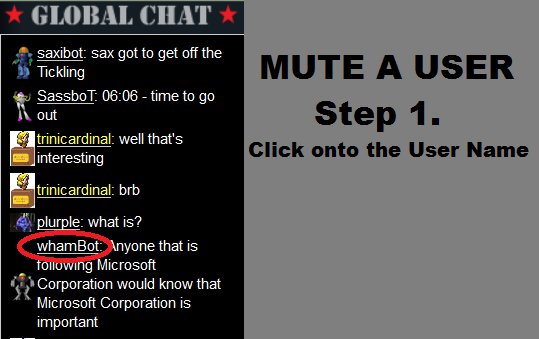
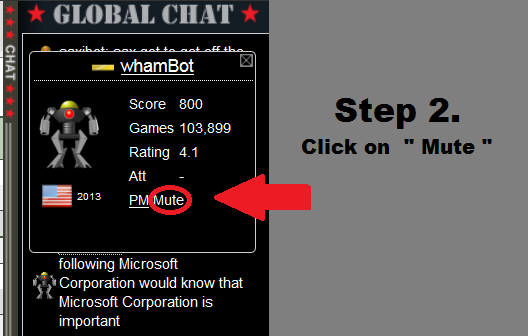
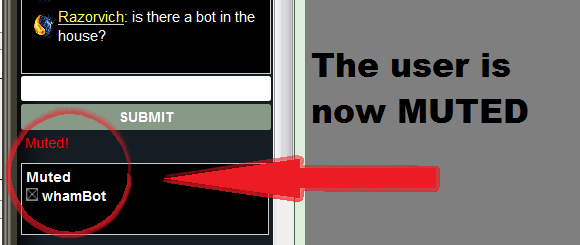
You will see their name appear in your muted box below and then you won’t see any more comments from them until you un-mute them or log off and back in. To un-mute them click on the little x next to their name in your Muted list.
The names of some chat moderators will show as yellow. These are the ones whose names are coloured purple on their walls. All other moderator names as well as regular usernames will show as white. Please follow any instructions etc from the chat moderators.
Remember that this is a basic chat so formatting of text in different styles and colours etc are not yet possible. Nor do links post as clickable links. These are options that may be implemented in the future but are not yet available. The only pictures that will currently show are a scaled down version of each user’s avatar (shown next to their name). Hopefully in time this will also change.
Sometimes while you have Global Chat open you might wish to hide it so you can see more of the page that you're on. To do so click on the Chat bar on the left side of the Global Chat and it will slide away. To open it back click on it again and it will reopen.
Unfortunately at this time it is not possible to get Global Chat while in the Forums and that is something that should be changed at a future date. I can’t say when exactly though since this will be up to
bigwham who is pretty busy with other aspects of the site.
FAQ’sQ. Why doesn’t this chat have features for posting text in bold, italics or colours?A. Please keep in mind that this is a simple chat program that
bigwham has written for the site to allow you greater communication in different areas of the site. As a result is not feature rich but will, in time, be improved so you can go ahead with your suggestions for improvement as well.
Q. Why are there no time-stamps for when messages are posted. A. Again because this is a basic chat time-stamps are not yet included. This is expected to be included in a future update.
Q. Can I mute myself?A. No you can’t…. do you really not want to see your own comments? We didn’t think so either
Q. Can I block/ban a user from Global Chat?A. Only Chat moderators can block/ban a user but you can mute a user so you won’t see his/her comments (mute works for bots also)
Q. How long will my mute last?A. The user will remain muted for you until you either un-mute them or you log off.
Q. My messages won’t post, I get “Message cannot be posted”. Did my chat break?A. Your message may contain words that are not allowed to be posted in Global Chat because they may be Bigoted or otherwise offensive. Try posting a different message. If that still doesn’t work you’re either still being too profane/bigoted or you have been blocked/banned from Global Chat.
Q. I don’t see my posts but I’m not getting any error messagesA. Your chat may not have automatically scrolled with the messages. Try scrolling down.
Q. I’ve tried scrolling as you suggested but Its not scrolling further down and I still don’t see my messages. Why are they not posting?A. Your messages may actually be posting but for some reason your chat hasn’t shown updated posts… try reloading the page or opening a new page.
Q. Why can’t I see global Chat from the Forums?A. The Forums and some other pages are on a different template to the other site pages. Unfortunately this makes it difficult to integrate Global Chat into those pages at this time.
Q. A user has violated the guidelines but a moderator is not there or did not deal with it properly.A. If you have a problem with a user’s posts or a moderator’s treatment of a situation please take screenshots of the violation/problem and send them to the Head Chatter (currently
trinicardinal) along with your explanation of the situation. It can then be investigated and appropriately dealt with.[/spoiler]
Suggestions Section- Index and Features! by JamesKer1[spoiler]Greetings!
The Suggestions Team is very proud to introduce the Suggestions Index!What does this mean?The
Suggestions Index, a concept originally started by
agentcom, is a monstrous project that has been behind the scenes, making a display for all suggestions, old and new, submitted and rejected, and anything in between. Please note that we have not been able to cram all 6000 suggestions into one place (hopefully you don't expect that of us), but we have done our best to accept the monumental task of doing so. We are hoping that this Index makes it easier for players to find suggestions from 2006 as well as those at the present, bringing back to life some of the best we have come up with. We are also trying to provide an easier way for the big guys to access suggestions they may like and get some inspiration from those.
The link is available
HERE, or you can simply go to the Suggestions Forum and access it!
Happy Thinking!
------------------------------------------------------------------------------------------------------------------------------------------------------------------------
The Suggestions Team is also excited to introduce
a new section for the CC Newsletter, featuring suggestions of all kinds, young and old, that have or have had popular interest! Our first one is below:
Over the years, the Suggestions Team has been blessed to have many users coming up with fantastic suggestions. Sadly, some of these suggestions get covered up by time, although they are or were popular. So today, the Suggestions Team would like to recognize and spotlight some of the contributions of
dakky21, for amazing ideas dating back to 2008!
Co-Operative Play (2008) (also known as Unimorphic Games or Co-op)- This suggestions is essentially a reverse of polymorphic games, allowing for two or more players to play as the same color. This setting would require lots of trust in teammates, however, it could be very well worth the effort!
Total Random Games (2014)- This suggestion allows for all randomized settings- not just a map. But, it also allows you to "pick-and-choose" whichever settings you want randomized, to safeguard against terrible combinations or allow some variance to the games.
Shared Regions (2014) [XML]- This is a fantastic suggestion for everyone involved in the mapmaking process. This is a very intricate suggestion, but would open a gateway for those in the mapmaking community!
Thank you again to
dakky21 for all of your creative juices and contribution to the suggestions process throughout the years![/spoiler]
Incremental Improvement by Dukasaur et al[spoiler]In
Issue 120 I challenged our readers to write their own late-breaking news section and identify the biggest new feature released last month. The winner was
dakky21 with his answer:
Subject: CC Dispatch [Issue 120] Two Contests, Mafia Back, UI Updatedakky21 wrote:A lot of bugs introduced? (just kidding)

I guess the biggest feature is - Global chat!
However, there were a lot of other good guesses:
iAmCaffeine wrote:The updates I've noticed so far:
- Highlight over all buttons
- New PM rolls
- Live Chat changed to Chat Rooms
- Are the quick links to My Games | Purchase | Terms Of Use | Privacy Policy | Rules new?
- Referral program has it's own tab?
That's all I've got for now.
Edit: The button highlight includes the ready/waiting/playing buttons next to a player's name in a game, just to clarify. Also, there is an in-game animation for rank changes. Not just New PM button rolling, but Post Reply, New Topic etc. all of that style.
Tazzy_J wrote:Are you referring to the text floating to the cursor on maps when attacking, reinforcing etc?
jackal31 wrote:the "rolling" of the buttons when passing over them with the mouse pointer.
stealth99 wrote:The champions Conquest Opens?
stealth99 wrote:Would it be the visual effects that occur in many screens. In the rating screen when you click on 5 stars, the others lite up in sequence quickly. I just won a star and the graphics for that have changed and they roll up in video as opposed to one screen image to the next. Lame i know but desperate times call for desperate measures.
Also, Beta Bucks Introduced and/or Olympic medals Introduced.
j1mathman wrote:you shrink down the broswer width-wise and it shows "club" instead of "community"?
Edit: and "Live Action" "Action Stream" under community?
I see Ats playing 2 speed games right now. impressive for poly(2) lol.
Dako wrote:Clans got tons of new stuff - All Clans, Clan Wars, Clan Leagues, Featured Games. Tournaments got Featured Games as well.
I don't rememebr if Maps were updated before or not but they have new UI as well.
Killer4 wrote:A bit of a shot in the dark since I only started playing again recently; but the stats, snapshot (or maybe analyse in snapshot) when you are looking at Live Action games? (I only see it when I'm logged out though, is that a premium thing?)
bamage wrote:The Continents Overview with its nifty bonus highlighting?
Thank you for all your answers!
It really blows your mind just how many incremental changes are being made all the time. Sometimes there are big new features being rolled out, but often it's little tiny things. The way things are going on Conquer Club are truly mind-blowing. It really is more like evolution than intelligent design. Sometimes there is a radical new change, but other times tiny incremental changes are being made. Some work really well and stay, others turn out to be failures and eventually get dumped. Some of them are new features, but most are just bug fixes or tweaks to existing systems. But all the time, the system gets better and better. The Panels, so clunky and unintuitive at first, have been improved steadily. Almost every week something about them gets better looking, more functional, less buggy, and in general more responsive.
There's no shortage of people asking, "why aren't the changes being reliably documented?" The simple answer is that there just isn't anyone who can. BigWham is the only one who knows everything he's doing, but as he points out, he needs to keep his nose to the grindstone and keep programming. Every minute that he's writing documentation is a minute that he's not programming, and that is a minute that we are falling short of becoming the sleek and sexy new CC that will finally start to grow again. The rest of us do what we can, but the changes are just so fast and furious that nobody can keep on top of them all.
I'm very involved, but I don't know most of what's going on. I'm not sure when the bots became animated. I know at some point they were static, and now they dance while taking their turn, but I'm not sure when it happened. I don't know when the "next game" link in the Overview panel got fixed. I know at one point it was full of bugs, and now it works fine, but I'm not sure when and how it happened. I'm not sure when the problem with panels re-setting got fixed. At one point it was a big hassle, and then one day I realized that it had been weeks since I had to re-organise my panels, but I of course don't know how many weeks. That's the way it so often is with bug fixes. You don't always realize something has been fixed when it happens, but one day you realize that something which used to be a problem hasn't bothered you lately, and suddenly you realize that someone must have fixed it, but you don't know when and how.
So, we are trying our best to use the Dispatch to bring you current information about things. The articles by
trinicardinal and
BigWham and
JamesKer1 in this issue represent a concerted effort to give you as much information as possible about new and upcoming features. However, there will still be times when I will have a "write your own news section" issue, because there is so much more that could be written.
Many thanks to everyone who participated in this mini-contest last time!

[/spoiler]
Firefox 31, BOB, and You by Dukasaur[spoiler]A huge number of people have been on the forums reporting problems with Firefox 31 and some of the add-on scripts that CC players know and love, like BOB.
BOB (and many other greasemonkey scripts) will not run in Firefox 31. You essentially have 2 choices:
- Give up on BOB, and start running Panel Mode with its built-in BOB-like features; or
- revert to Firefox 30.
Personally, I'm a fan of giving up on BOB. Yes, Panel Mode still does not have all the features that BOB used to, and it is still a bit buggy in places, but it improves steadily. It's already as good as BOB at some things, and better at others. Most of the early bugs have been worked out, and although some remain, overall it's a steady platform to work from. There is nobody maintaining BOB, and as time goes on it will fall further and further behind.
But anyway, that's your choice. If you do want to stay with BOB, you need to roll back to Firefox 30. In order to do that, you must first disable Automatic Updates in Firefox, or it will simply re-update itself to Firefox 31 the moment you shut down.
So, first go to your top bar in Firefox, click Tools > Options > select the Updates tab > select either of the updates (either Check or Never) which is not "Automatically check".
Once automatic updates are off, you are ready to roll back to Firefox 30. One common place to find it is:
http://www.v3.co.uk/articles/download_thanks/2035647#thanks (Thanks to ElrictheGreat) but you can always do your own search at your favourite download site. Rolling back to Firefox 30 should allow your BOB to keep working, at least for now.[/spoiler]